- Players need a common Nintendo account to link Pokemon Champions to HOME.
- Pokemon can be collected or sent back from the Recruit Option.
- The stats of the sent Pokemon can be retained only once in Champions.
One of the key features in Pokemon Champions includes recruiting Pokemon and building teams with them. This can also be done by transferring them from other games, by linking Pokemon Champions to Pokemon HOME. However, the process might feel complicated for some players. In this guide, you’ll learn how to link Pokemon Champions to Pokemon HOME, collect or send them back.
How to Connect Pokemon HOME to Champions
Connecting Pokemon HOME to Champions is a bit different for Switch and Mobile users. Here’s how you can do it.
Pokemon HOME Nintendo Switch App
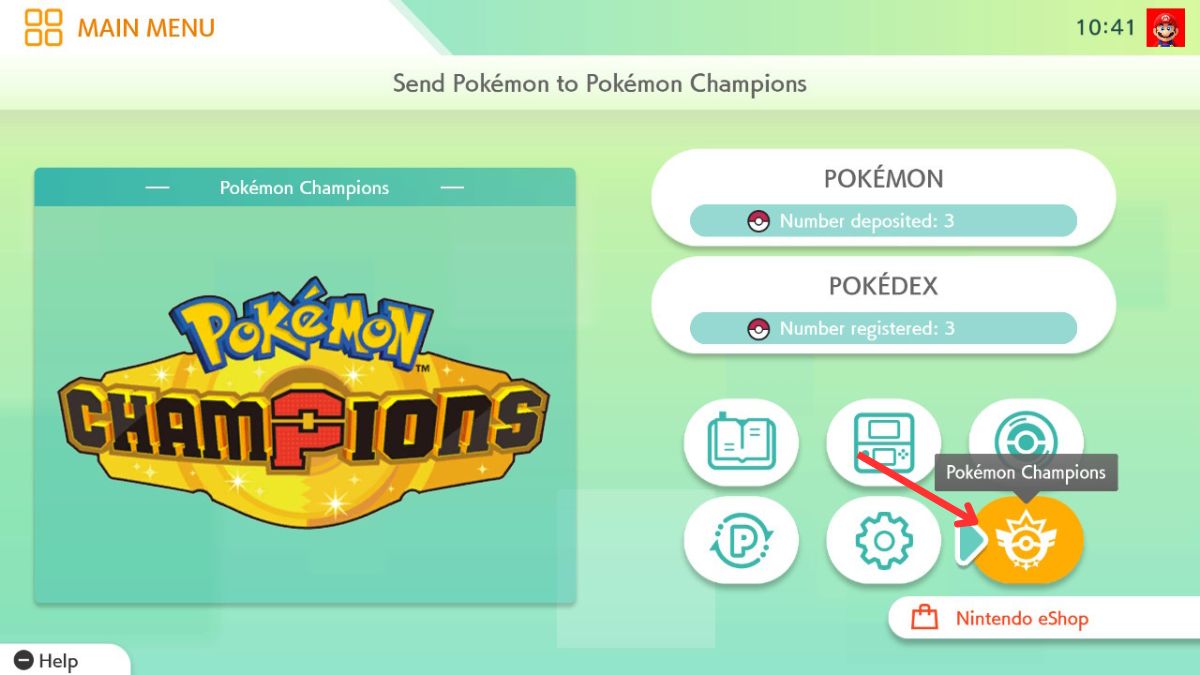
Players can link Pokemon Champions to Pokemon HOME by logging in to both apps using the same Nintendo Account. Once logged in, follow the steps given below to start the linking process:
- Click on the Pokemon Champions option in the opening screen.
- Verify the name of the Nintendo Account that you want to connect.
- Click on Yes to link Pokemon Champions with Pokemon HOME.

Pokemon HOME Mobile App
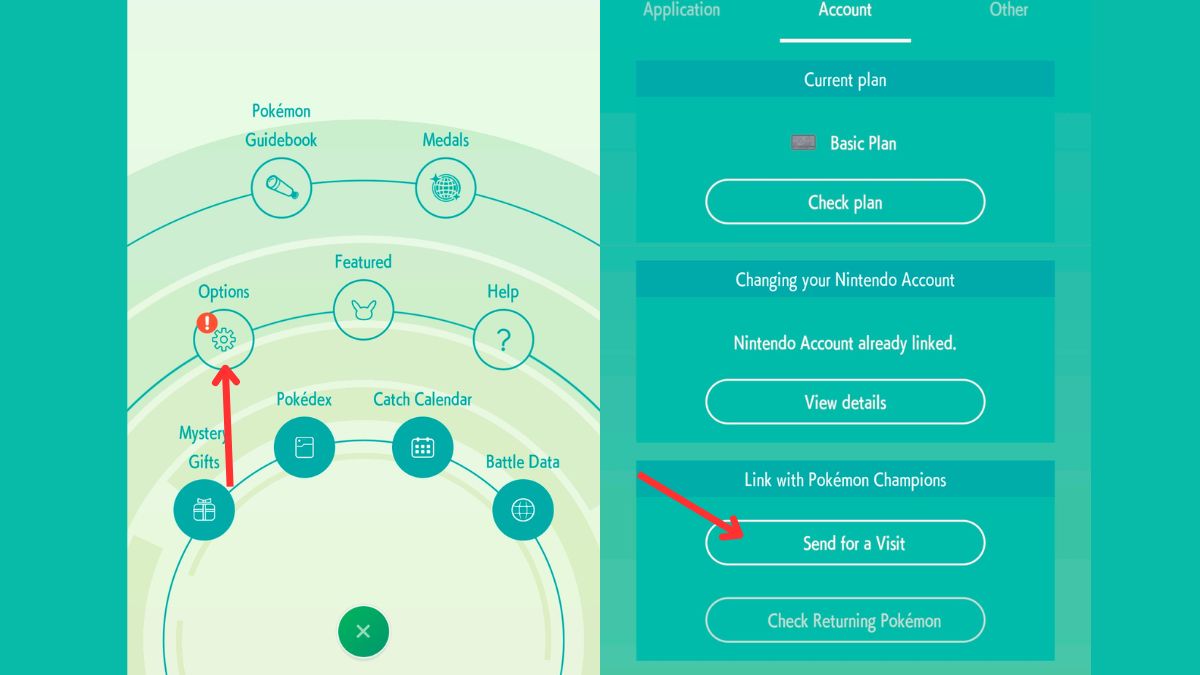
Mobile players can link Pokemon Champions to Pokemon HOME through the mobile application for HOME. However, Champions on mobile has not been released yet, which is why you might face an error if you aren’t sharing the same account on your Switch. On the other hand, Switch players can connect by following the steps given below:
- Open the Menu on your Pokemon HOME mobile app.
- Select Options.
- Under the Link with Pokemon Champions, click on the Send for a Visit.
- Now, link Pokemon HOME to Champions using the same Nintendo account that’s logged in to your Switch console.
Now, you can successfully send Pokemon from HOME to Champions. Before you move on to transferring Pokemon, you must learn about their weaknesses and coverage to make the perfect team. That’s why we recommend that you check our Pokemon Type Chart, as it will help you to build the perfect team that covers each other’s weaknesses.
How to Collect Pokemon from HOME in Champions
As a free-to-play game, you’ll be mostly collecting Pokemon from HOME. This can be done only after linking Pokemon HOME to Pokemon Champions. But before you proceed, we want you to take a look at the table below, listing all the conditions for moving Pokemon.
Before you transfer Pokemon from HOME to Champions, here are some key points that you must keep in mind:
Pokemon Transferring Restrictions Details Pokemon HOME Restrictions When a Pokemon is sent to Pokemon Champions, you cannot perform the following actions in Pokémon HOME:
– Send it to other Pokemon HOME games
– Trade it (GTS / Wonder Box / Room Trade / Friend Trade)
– Release it from your Boxes
– Mark or unmark it as a Favorite
– Assign labels to them
– Cannot send Pokemon that do not appear in Champions
– Pokemon obtained in Champions cannot be sent back into HOMEStrength Restrictions The Pokemon’s current strength will be used to determine its strength in Pokemon Champions. Stat Restrictions Pokemon training in Champions won’t carry over to HOME. However, when they return to Champions in the same state, their training will be retained. This is applicable only once. Team Restriction Pokemon registered in Champions Battle Teams will be removed after sending them back to Pokemon HOME.
However, to collect the Pokemon from HOME in Champions, you must follow the exact steps:
- Click on the Recruit option of the Main Menu in Pokemon Champions.
- Open the Collect from Pokemon HOME option.
- Select the Collect option, and agree to Yes. Make sure to read the conditions for transferring Pokemon before you agree.


We recommend that you catch Pokemon like Mewtwo from GO and move them into HOME, so that you can transfer them into Champions and collect them.
How to Send Back Pokemon from Champions to HOME
Similar to collecting Pokemon, you can also send them back from Champions to HOME, by following the steps given below:
- Click on the Recruit option of the Main Menu in Pokemon Champions.
- Open the Send Back to Pokemon HOME option.
- Select the Pokemon you want to send back.
- Click X on your console, and confirm Yes to send them.


That sums up everything for linking Pokemon Champions to Pokemon HOME. Did you train any Pokemon yet? Let us know in the comments below.
Players can connect Pokemon Champions to Pokemon HOME by linking them using a common Nintendo Switch account.
Yes, Pokemon from Champions can be sent back into HOME if it wasn’t obtained in Champions.
No, any stat changes made on your Pokemon in Champions won’t remain the same when sent back in HOME.