
- Hytale has disabled PvP by default in the game.
- Players can enable it for the in-game servers from the world settings screen.
- For the dedicated servers, they can do so by editing a command in the config.json file found in the worlds folder.
PvP in Hytale can uplift your experience while playing with your friends and exploring the world. So, if you have already mastered combat and fighting, and the monsters seem unexciting, it’s time to go head-to-head with real players.
Turning on PvP in Hytale can open up new possibilities like friendly duels, organized tournaments, or even faction warfare. So, get into this guide and find out all the steps to enable PvP on Hytale and get ready for some player-versus-player action.
How to Enable PvP in an In-Game Hytale Server
If you’re hosting or playing a local co-op world and have created a Hytale server, PvP can be enabled using the world settings. So follow the steps below to enable PvP in the Hytale world.:
- Open Hytale and select Worlds from the main menu.
- Now, click on Create world or edit any existing world.
- For a new world, click on the cog wheel icon to open the world settings.
- On the world settings screen, toggle on the PvP option and save the changes.

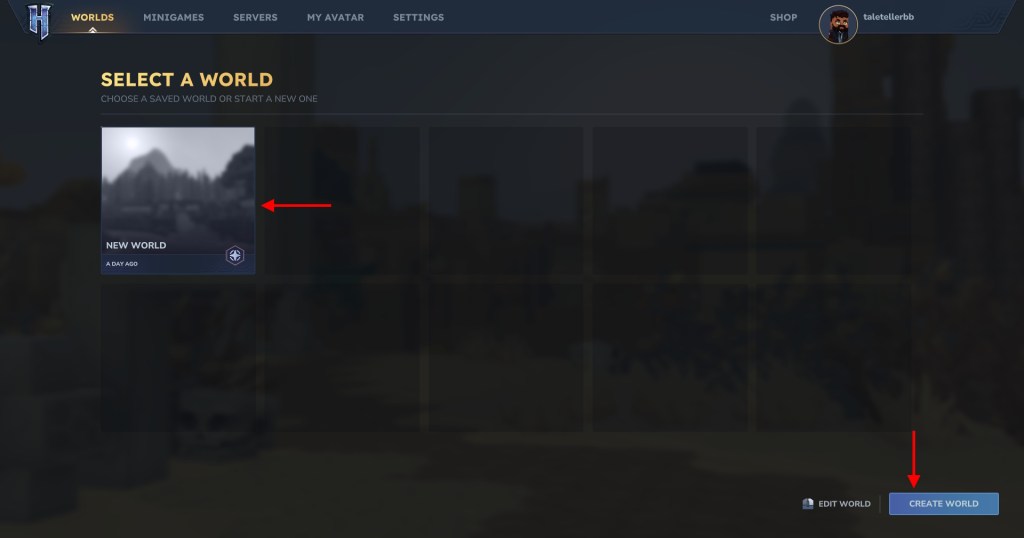

Now, in this world, players can readily take on other players online and attack each other.
How to Enable PvP on a Dedicated Hytale Server
The dedicated Hytale server hosting services are ideal for larger groups of friends or communities who are looking for a competitive environment. The steps given below are specifically for Apex Hosting, but the process is more or less the same for other hosting services present online:
- Before making any changes, make sure that you have stopped the server.
- Click on the FTP File Access and log in with your password.
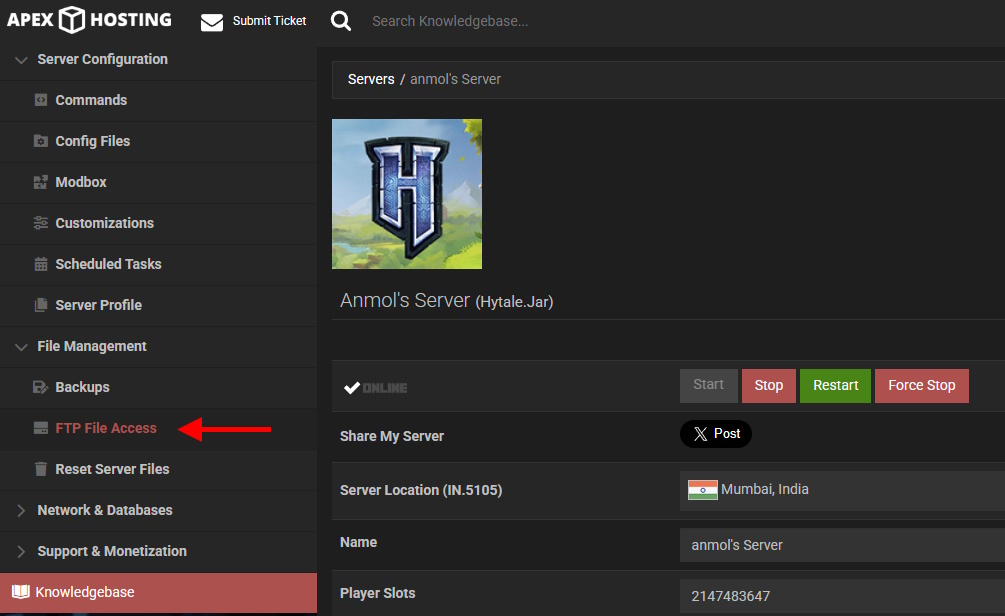
- Here, on your server hosting file manager, find the universe folder, and look for the world folder inside it.
- Inside this folder, you will get the config.json file. Expand it and look for the following line – “IsPvPEnabled”: false.

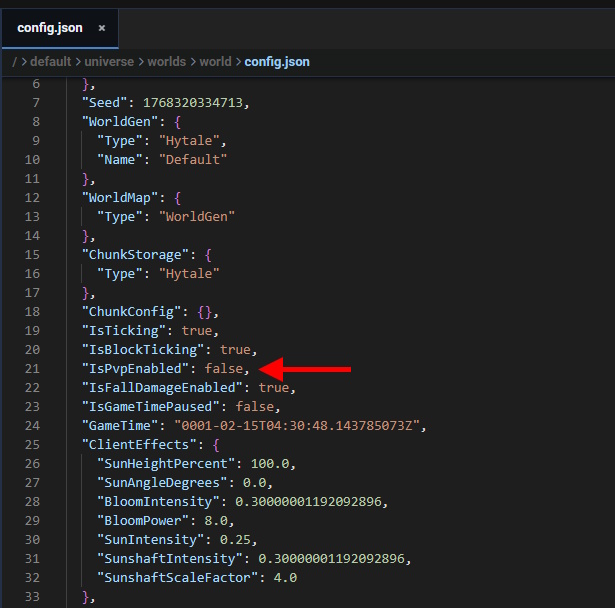
- Change the ‘false‘ value to true and save the changes.
- But if you’re the server admin, you can also get inside the game and type the following Hytale command: /world config pvp true.
And that is how you can enable the player-vs-player mode in your Hytale server. Do check out our list of some of the best Hytale mods to further enhance your gameplay experience. So, are you ready to challenge your friends and fight other real players? Tell us in the comments below.
No, PvP is disabled by default in both the Hytale game server and other online dedicated servers.
If you’re trying to join an in-game Hytale server made by your friends, and your connection keeps failing, it may happen because their network type may be UPnP. This can be fixed by manual port forwarding or logging into the router admin panel and turning on the UPnP.
There can be a total of 100 players at a time on the in-game Hytale server.






 Bipradeep Biswas