- Roblox recorded 4.05 billion hours of playtime across PC and console in the first half of 2026, according to Newzoo.
- Around 80% of Roblox players over 16 spent money on games in the past six months, compared to 59% of non-Roblox players.
- Players can check their Roblox Screen Time under Settings to view their top 20 experiences from the last seven days, but lifetime playtime is unavailable.
Roblox hits the charts again as the total recorded playtime goes up to 4.05 billion hours across PC and console in the first half of 2026. This shows how Roblox continues to grow in popularity, with more players spending time across different experiences. Below, we cover the full H1 2026 report and show you how to check your playtime hours in Roblox.
Roblox Playtime Hours in H1 2026
According to a report by Newzoo, Roblox is not only gaining new players but also attracting an older audience. Arcade, co-op, and survival horror games remain popular, while anime and animation fandoms are also growing on the platform. With so many anime games on Roblox, the popularity is quite obvious.

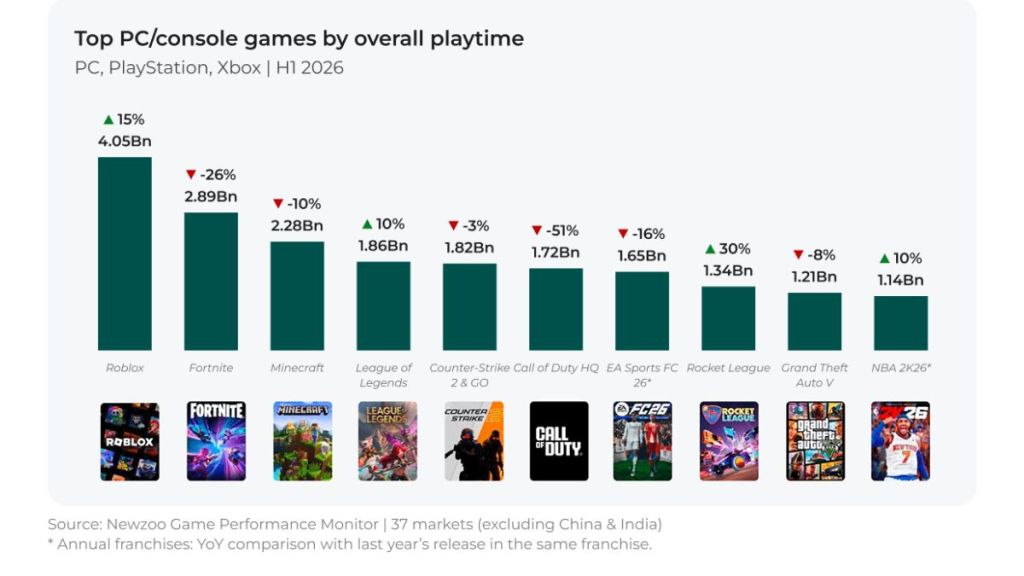
The report also shows how Roblox players differ from traditional PC and console players. Around 80% of Roblox players over 16 spent money on games in the past six months, compared to 59% of non-Roblox players.
Yes, you heard it right. If you are one of them who spends on gift cards, you should already know how to redeem codes in Roblox.
How to Check Your Roblox Playtime Hours
Roblox currently does not have a feature to check your lifetime playtime hours. However, you can use its screen time feature to keep track of your activity. This lets you monitor your activity and the experiences you have played the most.
Follow these steps to check your Roblox playtime on PC or mobile:
- Open Roblox in your browser or app and make sure you are signed in.
- Click the three-line menu in the top-left corner.
- Select Settings.
- Open Privacy & content restrictions.
- Select Screen Time and wait for it to load.
- Select Top Games to view your playtime insights.
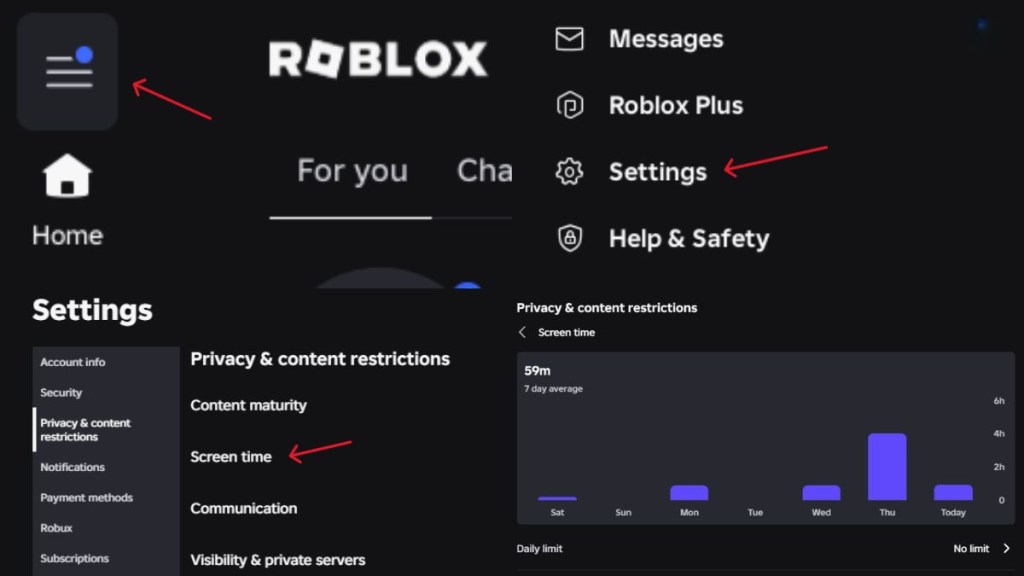
This shows you insights into your top 20 experiences you have played in the last seven days. So, if you are playing on the platform a lot, make sure you are using the Roblox game codes for some freebies.
You can also check the insights from the Parental Controls if you want to monitor your child’s screen time, friends, spending, and more.
Currently, Roblox does not have the feature to show your lifetime playtime hours. You can still use the screen time feature to monitor your recent playtime.
The Screen Time feature of Roblox only shows you the top 20 experiences you have played in the last week.
Just like on PC, you can check your playtime using the Roblox app on your phone.