- Preload for Pokemon Pokopia has gone live ahead of release.
- You need to preorder the game to preload it and have it appear on the Switch 2 home page.
- You need around 10 GB of free space on your Switch 2 to install it.
The highly anticipated Pokemon Pokopia title is right around the corner. The game releases this week for Nintendo Switch 2, and right on queue, the preload for Pokemon Pokopia has gone live. If you have already pre-ordered the game, here’s how to preload Pokemon Pokopia before the game releases.
Complete Steps to Preload Pokemon Pokopia on Nintendo Switch 2
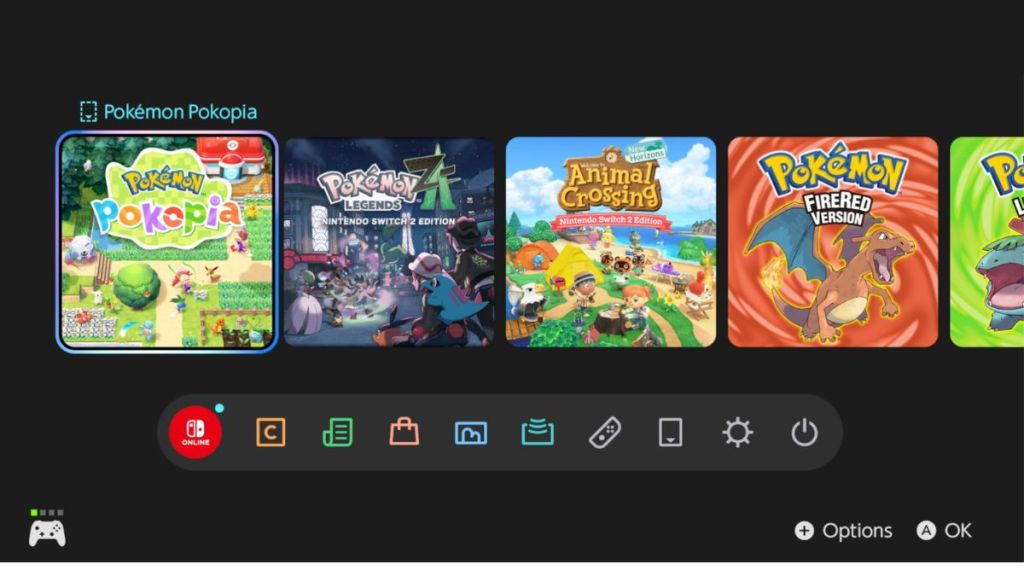
To preload Pokemon Pokopia, first, you’ll need to pre-order the game. Check out our Pokemon Pokopia guide if you don’t know how to pre-order. Once you do that, simply follow the steps below to get the preload started:
- Turn on your Nintendo Switch 2 console that you will be using to play the game.
- Go to the Nintendo eShop located at the bottom of your Nintendo Switch home page.
- Tap the search bar and search for Pokemon Pokopia.
- If you have already purchased the game, then it will show ‘Pre-Ordered.’
- The game will appear on your Nintendo Switch home page once the preloading option is made available. You can click on the game to start preloading.
This will allow you to play the game at launch based on your region. If you aren’t sure about the timings, then check out our Pokemon Pokopia Release Countdown to help you out.
When you start playing Pokemon Pokopia as soon as it releases, you may come across an error that tells you that you cannot play the software yet. Wait for a few minutes before you start the game to fix this error.
Pokemon Pokopia File Size
The preloads for Pokemon Pokopia went live before the Pokemon Presents 2026 Livestream, ahead of the game’s release. Sadly, the game is available only for Nintendo Switch 2, but you can still play Pokemon Pokopia on Switch 1 using GameShare. In terms of file size, you will need 10 GB of free space.
Here are some other details that you must know before preloading Pokemon Pokopia:
- Supported play modes: TV mode, Tabletop mode, and Handheld mode
- No. of players: Single System (1), Local wireless (2-4), and Online (1-4)
- GameShare Supported: Local Users and Users in Gamechat Session
- Save Data and Cloud Backup: Supported
- Nintendo Account family-group lending: Supported
Make sure that your Nintendo Switch 2 has enough storage available before you start preloading the game. If your memory is almost full, then you might need to use a MicroSD card. Make sure to get one that Nintendo Switch 2 supports.
That’s everything you need to know about preloading Pokemon Pokopia Switch 2. Have you preloaded the game yet? Let us know in the comments.
You cannot preload Pokemon Pokopia on Switch 1 as it’s exclusive to Switch 2.
Pokemon Pokopia costs $70.
Yes, Pokemon Pokopia is available for purchase in physical format, though with a game key card.