Update: added new Do Not Stop codes on November 17, 2026
Do Not Stop is a horror driving game where you are chased by a horrifying monster. Getting caught will lead to a horrifying end. But when you are putting your life on the line, why not look good as well? So, use Do Not Stop codes and get free credits. Use them to open crates and get some of the best cosmetics in the game.
All New Do Not Stop Codes
- TOURNAMENT: 250 credits (NEW)
- UPDATE2: 250 credits (NEW)
- RELEASE: 250 credits (NEW)
- LASTSTOP: 250 credits (NEW)
- DONOTSTOP: 200 credits (NEW)
- ROUTE1610: 150 credits (NEW)
Expired Do Not Stop Codes
As of yet, there are no expired codes in this game. When the above codes expire, we will move them to the next section.
If you like horror games, you should try out Survive the Backrooms, The Mimic, and Lurking Giants. Have had enough scaring? Check out our Roblox game codes list, and make try out some new games from our massive library.
How to Redeem Do Not Stop Codes
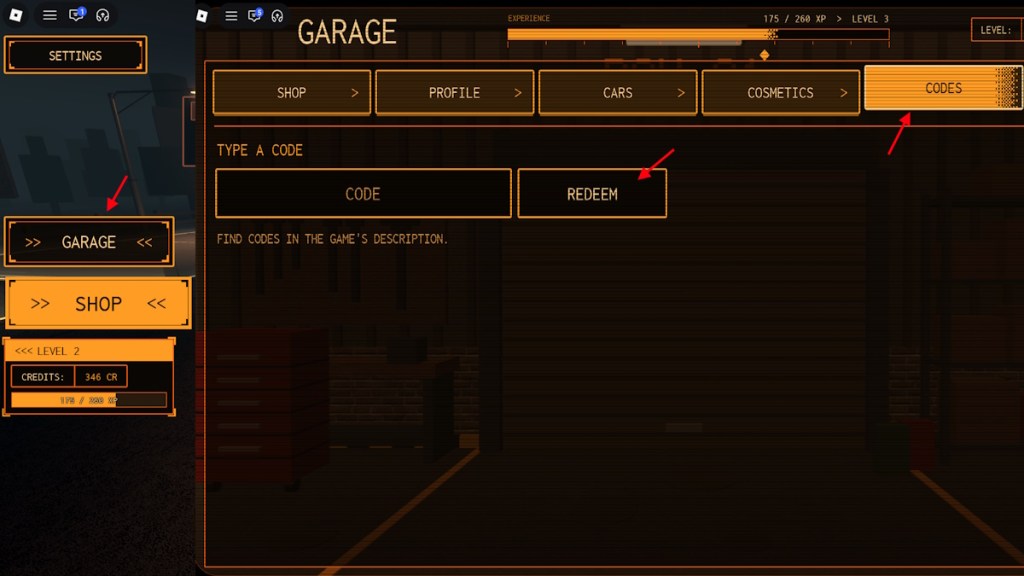
If you want to redeem the codes for Do Not Stop, all you have to do is follow the steps given here:
- Launch Do Not Stop on Roblox.
- Click on Garage on the left side of the screen.
- Select the Codes option.
- Type a working code in the ‘CODE’ box.
- Click REDEEM to claim your rewards.
How to Get More Do Not Stop Codes
If you want to constantly open crates, the best way to get credits is from codes. But codes are limited, and tracking them is quite difficult alone. So, if you want to track the latest codes for Do Not Stop, all you have to do is bookmark our guide here. We always update our codes list with the latest entries, making it the best place to get codes for this game.
So, simply bookmark our post here and revisit it when you are looking for active codes. Other than that, you can always join the Do Not Stop Discord server and follow their announcements to track updates. By tracking updates, you will know when to look for new codes.
Why Are My Do Not Stop Codes Not Working?
When codes are not working for you, it can be due to the Roblox client being bugged. First, try restarting the game client a couple of times. If that doesn’t work, the issue might be due to simple typos. Make sure you are entering the codes correctly. Use the copy button in our list to copy and paste it directly into the game to get your rewards.
So, how far have you made it in Do Not Stop? Tell us about your experience in the comments section below.









 Matthew Wilkins

 Sanmay Chakrabarti





 Sanmay Chakrabarti