Update: checked for new Survive the Backrooms codes on October 1, 2026
Survive the Backrooms is a classic horror survival game where you have to loot resources and craft equipment to survive the horrors. Play with your friends and cooperate to create an impenetrable base to survive the countless nights. But sometimes pure teamwork is not enough, and instead, you will need to rely on classes to become stronger. Use Survive the Backrooms codes from our list here to obtain free emeralds in the game. To unlock classes and get stronger in the game, you will need these emeralds.
All New Survive the Backrooms Codes
- SALIMBRADLEY: 7 Emeralds (NEW)
Expired Survive the Backrooms Codes
Currently, there are no expired codes for this Roblox Experience. When the above codes expire, they will be moved to this section.
Until new codes arrive, why not try other horror survival games? Try out Bite By Night, Scary Shawarma Kiosk the Anomaly, and Self-Aware Robot. These are all horror games that will give a similar feel to Survive the Backrooms. Other than that, you can always check our Roblox game codes list to find more amazing games.
How to Redeem Survive the Backrooms Codes
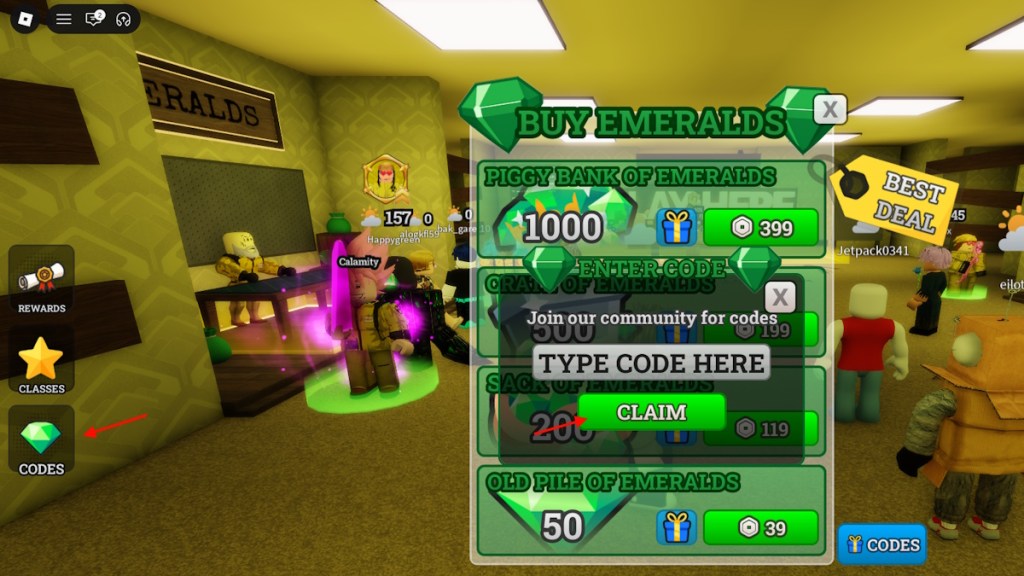
To redeem the codes for Survive the Backrooms, all you have to do is follow the steps given below:
- Launch Survive the Backrooms on Roblox.
- Select the Codes option from the left part of the screen.
- Type a working code in the ‘TYPE CODE HERE’ box.
- Click on CLAIM to redeem the rewards.
How to Get More Survive the Backrooms Codes
There are many ways to find codes for Survive the Backrooms, but the most optimal method is to bookmark our post here. We always add the latest codes without fail, so you will always find the active codes here on our list. Other than that, you can try following the game’s social accounts to track codes yourself.
The best way to do it by yourself is by joining the Survive the Backrooms Discord server. Once you have joined the server, keep your eyes on the ‘codes’ channel. Newly revealed codes will be added here; however, you may not receive notifications for them. So, our list here is still the best option to track codes without too much work on your end.
Why Are My Survive the Backrooms Codes Not Working?
If your Survive the Backrooms codes are not working, the very first thing you need to do is restart your Roblox client. If the issue persists, check if the code was released recently. When it comes to new codes, it’s best to wait a couple of hours before redeeming them. This is because new codes often only work on new servers.
With that said, you also need to make sure not to mistype the codes. An easy way to avoid such issues is simply copying and pasting the code directly from our list here. If the issue continues to persist, then it is likely that the code has expired.
So, how long have you survived in the backrooms? Tell us all about it in the comments section below.