- Players can unblock previously blocked user accounts on Roblox.
- The settings are located inside Privacy and Content Maturity.
- Players can also visit their profile to unblock the user.
Did you block someone on Roblox by mistake and want to add them back? Or maybe you want to play with a friend you blocked earlier. Despite the accidental reasons, Roblox lets you unblock users through your account settings. In this guide, we will tell you how to unblock someone on Roblox.
How to Unblock Someone on Roblox Mobile
If you have blocked someone from your Roblox friends list and you want to unblock them, follow these steps on your mobile:
- Open the Roblox app on your phone or tablet.
- Tap the three lines (hamburger menu) in the top-left corner.
- Scroll down and select Settings.
- Tap Privacy & content restrictions.
- Select Blocked users.
- Find the person you want to unblock and tap Unblock next to their username.

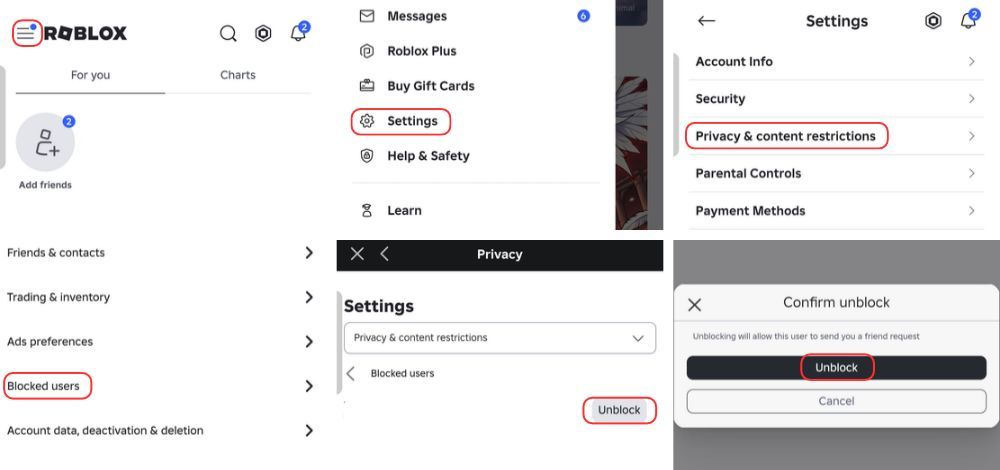
The player will be removed from your blocked list immediately. This is better than going through the hassle of appearing offline on Roblox while being friends.
How to Unblock Someone on Roblox PC
Just like on mobile, you can unblock players through the Roblox website or desktop app.
- Open Roblox and click the three lines (hamburger menu) in the top-left corner.
- Select Settings.
- Open privacy & content restrictions.
- Select the Blocked users option.
- Find the player you want to unblock.
- Click Unblock next to their name.
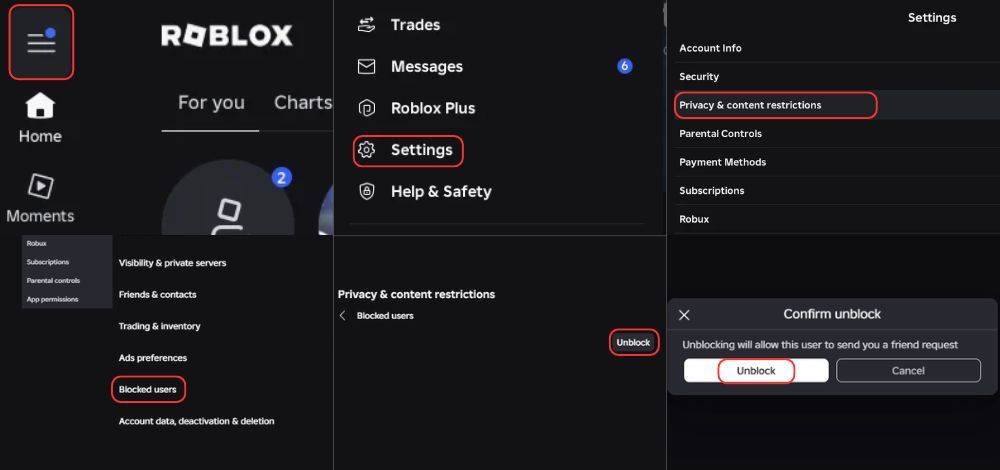
If you join a group in Roblox, blocking does not hide public posts on the group wall. As you will still see their posts, you might get confused about the block status. It is better if you try sending them a friend request to check.
That is how you unblock someone on Roblox. Did you ever block someone by mistake? Let us know in the comments.
Yes, you can unblock players through the Blocked Users section in your privacy settings.
Roblox does not send a notification when you unblock someone.