- Players can turn joins off by changing their privacy settings in Roblox.
- Set "Who can join me in experiences?" to "No one" to stop others from joining the games.
- Players can also hide the online status and current experience for more privacy.
Imagine you are grinding for rare items in some game on Roblox and someone from your profile joins you and takes them away. It can get annoying if you want to play alone or do not want friends and other players joining your experience. In this guide, we will tell you how to turn your joins off in Roblox.
What Is Joins in Roblox?
Joins is a privacy setting in Roblox that lets other players join your experience through your profile. Luckily, you can turn this feature off through your account settings. You can also appear offline on Roblox and remove your online status from the experience you are currently playing.
This lets you enjoy the experience with privacy. So, your next Fisch grind will be more relaxing.
How to Turn Joins Off in Roblox on Mobile
Follow these steps to turn joins off in Roblox on mobile:
- Open the Roblox app and tap the three lines (hamburger menu) in the top-left corner.
- Select the Settings (gear icon) option from the menu.
- Open privacy & content restrictions.
- Tap Visibility & private servers, then select Visibility.
- Find ‘Show current game’ and set it to No one.

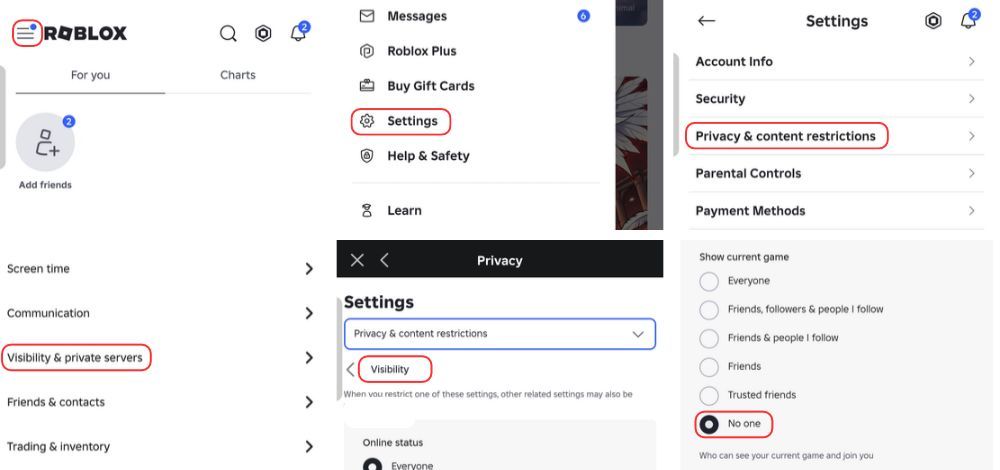
You can also turn off the ‘Share activity updates’ so your friends do not receive updates about your recent activity in the game.
How to Turn Joins Off in Roblox on PC
Just like on mobile, you can change your privacy settings through the desktop app or website to turn joins off in Roblox. Here is what you need to do:
- Open Roblox and click the three lines (hamburger menu) in the top-left corner.
- Click on the Settings (gear icon) option from the menu.
- Click on Privacy & content restrictions.
- Open Visibility & private servers, then select Visibility.
- Scroll down till you see ‘Show current game’.
- Set it to ‘No one’.
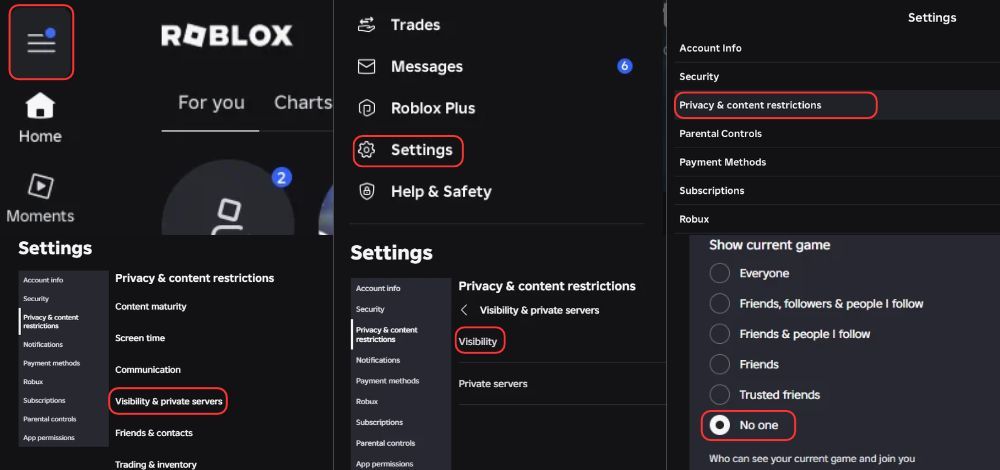
Once you change these settings, other players will no longer be able to join your experiences through your profile. This will help you stay solo in Blox Fruits private server if you want to keep your grind to yourself.
That is how you turn off joins in Roblox. Do you think Roblox should add more privacy features like this? Let us know in the comments.
After turning your joins off, you will still be able to invite your friends in-game.
Once you turn off joins, it auto-applies to all the experiences you are going to join.
If your account is under 13, you may require a parent or guardian’s PIN to access the restricted privacy settings.