Update: checked for new Brainblast a Lucky Block codes on November 1, 2026
Brainblast a Lucky Block is the absolute peak of what a brainrot game can achieve. The game is about kicking lucky blocks, which spawn brainrots that then have to run away from the boss, and after all that, it can be planted in your base to generate money. You can do all that much better by using the active Brainblast a Lucky Block codes, as they give free boost potions and exclusive lucky blocks.
All New Brainblast a Lucky Block Codes
- UPDATE3: 1 Exclusive Lucky Block (NEW)
- ILOVEYALL: Free Potions (NEW)
- DONTEXPLOIT: Free Potions and 1 Exclusive Lucky Block (NEW)
Expired Brainblast a Lucky Block Codes
Currently, there are no expired codes for this Roblox Experience. Once a code expires, we will move it here.
If you enjoy playing brainrot games, then check out Split or Steal Brainrot, Be a Brainrot, and Yeet a Brainrot. If you don’t like our recommendations, head to our Roblox game codes list and pick your next adventure yourself.
How to Redeem Brainblast a Lucky Block Codes
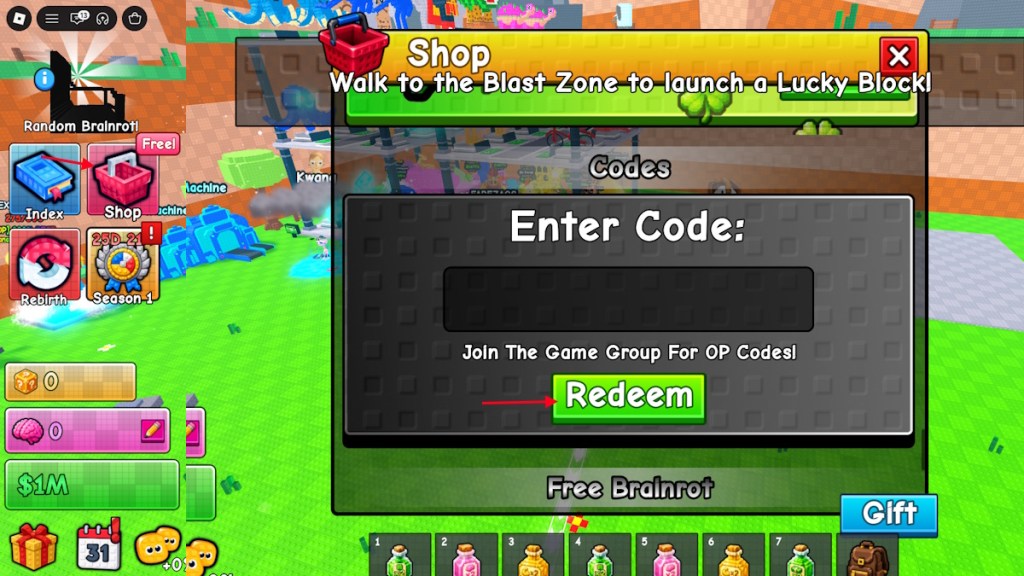
Redeeming the codes for Brainblast a Lucky Block is fairly simple and doesn’t require you to join any group. Here is what you need to do to redeem the codes:
- Launch Brainblast a Lucky Block on Roblox.
- Click on the Shop option on the left side of the screen.
- Scroll down to the Codes section.
- Type a working code in the empty box.
- Click on Redeem to claim the rewards.
How to Get More Brainblast a Lucky Block Codes
To find more codes for Brainblast a Lucky Block, all you have to do is bookmark our post here. We make sure to add the latest codes here without delay. The developers generally release codes with every event, but there is no ‘one’ location to find all the codes, other than our guide here.
So, instead of looking for codes yourself, you can rely on us to find the codes for you. Other than that, join the Pasta Devs Roblox community. Here you can track the upcoming updates and know when to check for codes.
Why Are My Brainblast a Lucky Block Codes Not Working?
There can be various reasons why codes are not working for this experience. The most likely cause is spelling issues. One of the easiest fixes for this problem is simply copying and pasting the codes from our list directly. Other than that, try restarting the client once and see if that solves the problem. If none of these methods work, the code has likely expired.
So, are you enjoying brainblasting the lucky block? Tell us in the comments section below.