- Guilds in Sailor Piece Sea 2 let players team up, earn points, and compete for leaderboard rewards.
- Players need level 10,000 and a Guild Key to create a guild through the Guild Master on Punch Island.
- Joining a guild is done through search or invites, and strong teams perform better on leaderboards.
The Sea 2 update introduces the guild system to Sailor Piece. This unique mechanic lets players gather up and fight for a leaderboard position. And staying on top of the leaderboard unlocks various rewards. Here is everything you should know about Sailor Piece Guilds, along with how to create or join them and the rewards.
Editor’s Note: last updated on May 10, 2026, to include guild rewards added in the Huge Update
How to Create Guilds in Sailor Piece
To create a Guild, you must reach 10,000 level and acquire a Guild Key in Sailor Piece. Once you unlock the Sea 2 in Sailor Piece, teleport to Punch Island and walk toward the center of where all roads meet. This is where the Cosmic Being boss spawns. On the right side of the boss, you will find the Guild Master NPC.
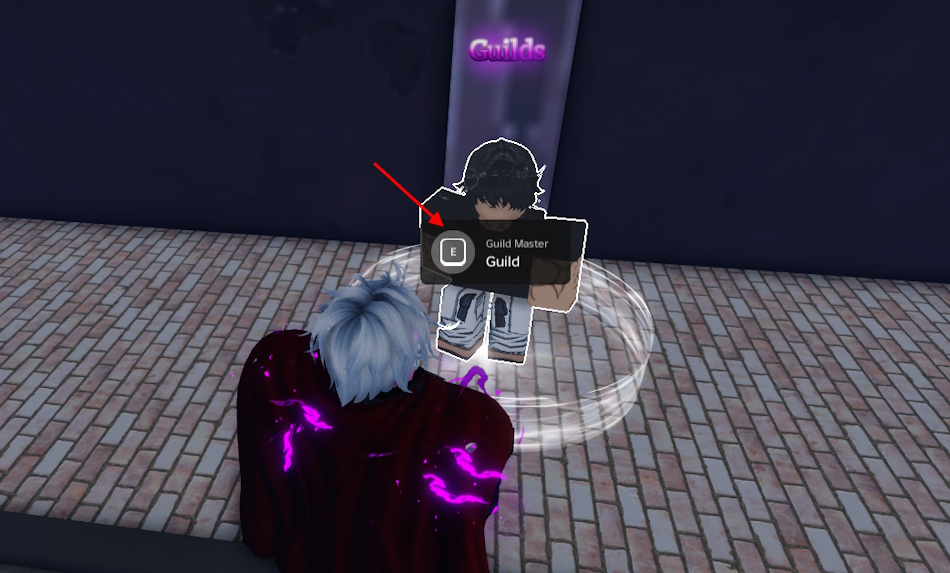
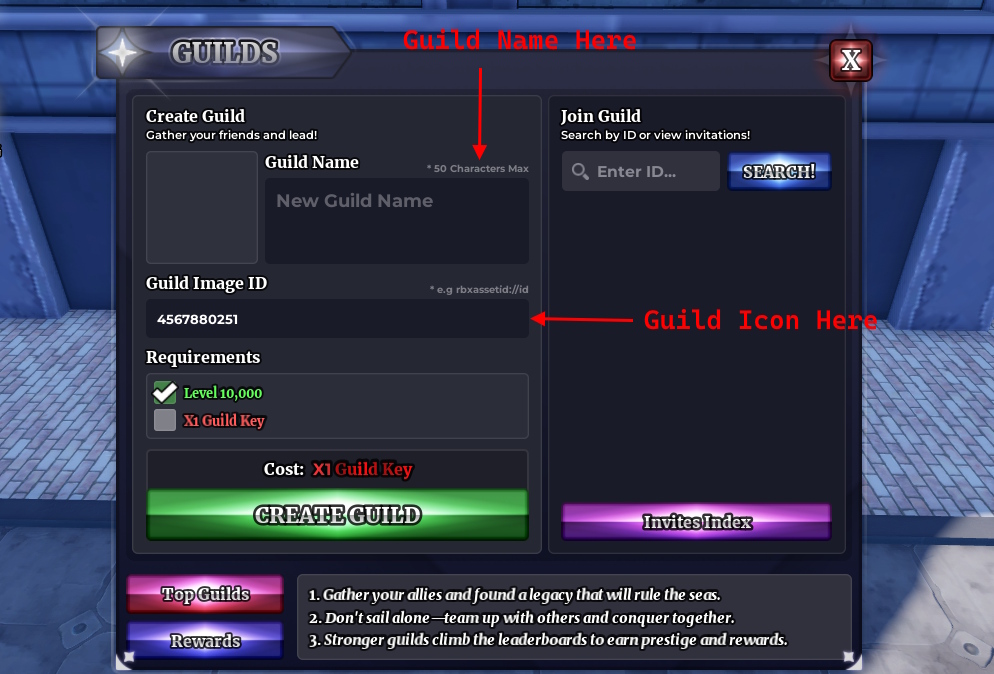
Once there, here is how you can create Guilds in Sailor Piece:
- Interact with the Guild Master NPC by pressing the E key.
- Type a name in the Guild Name section.
- Use any Roblox decal ID that you want as your Guild icon.
- Click the ‘Create Build‘ button.
How to Join Guilds in Sailor Piece
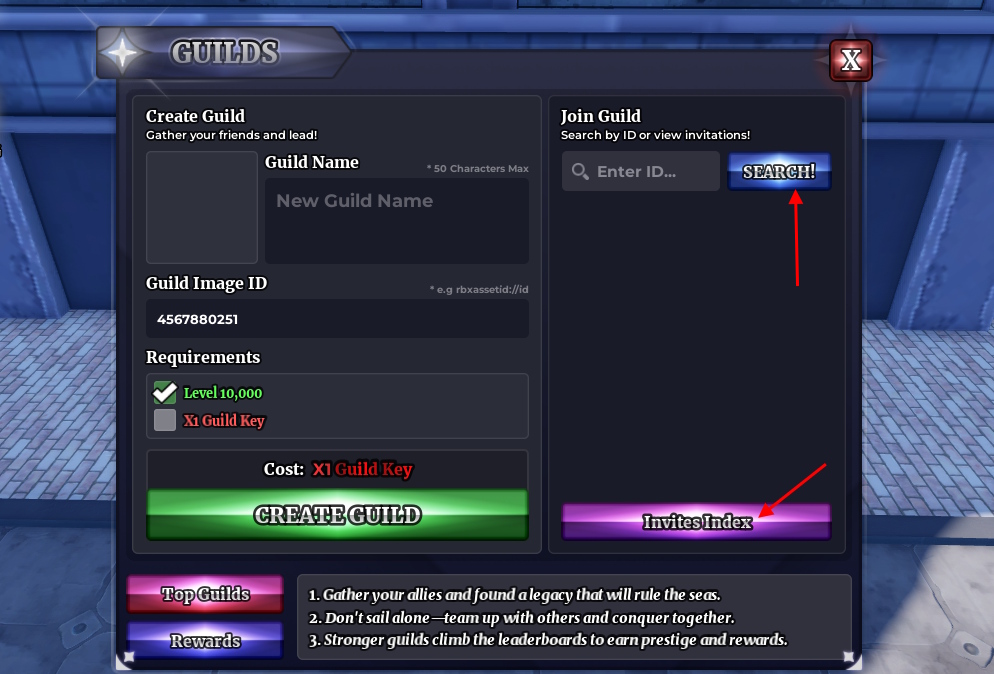
Once a Guild is created, players can join it by searching, or the admin may invite players. Given the feature is from Sea 2 of Sailor Piece, it is better to invite players who are on equal damage stats. Here is how it works:
- Enter the Guild ID and click on the SEARCH! button.
- Once you find the Guild, click join to send a request.
- Admin of the Guild may accept the invite to let you in.
- If a Guild sends you an invite, click the Invites Index and join from there.
Sailor Piece Guild Explained
Now that you are in a Guild, here is how you can navigate through the menu and what you can do from the options:
Overview
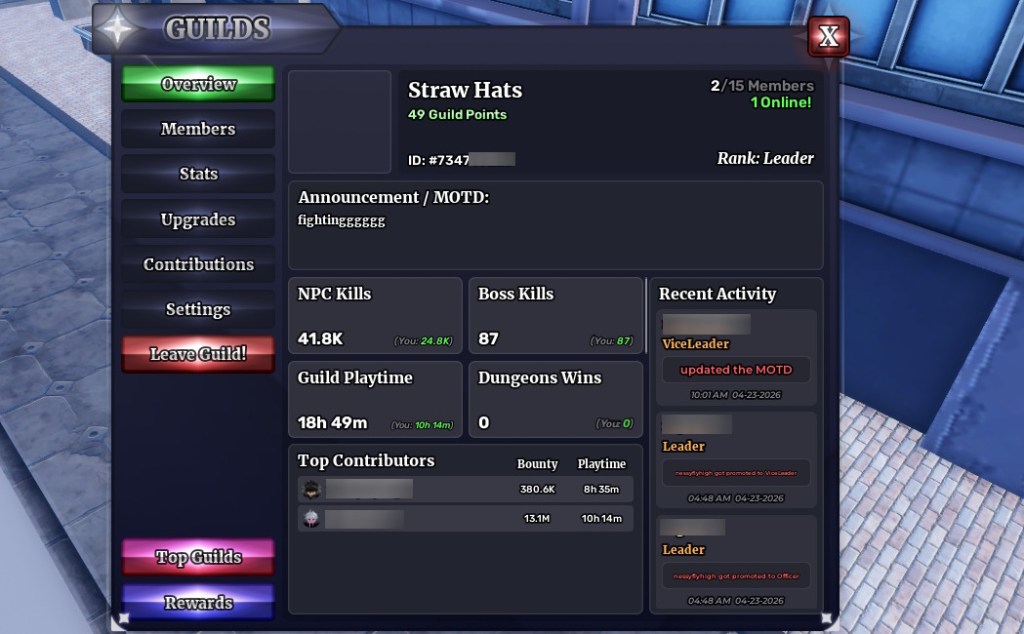
Once you enter the Guilde, the first tab you find is the overview menu. This will show member information, Guild ID, recent activity, and the guild points. You can also scroll on the quick stats section to check more stats.
Manage Members
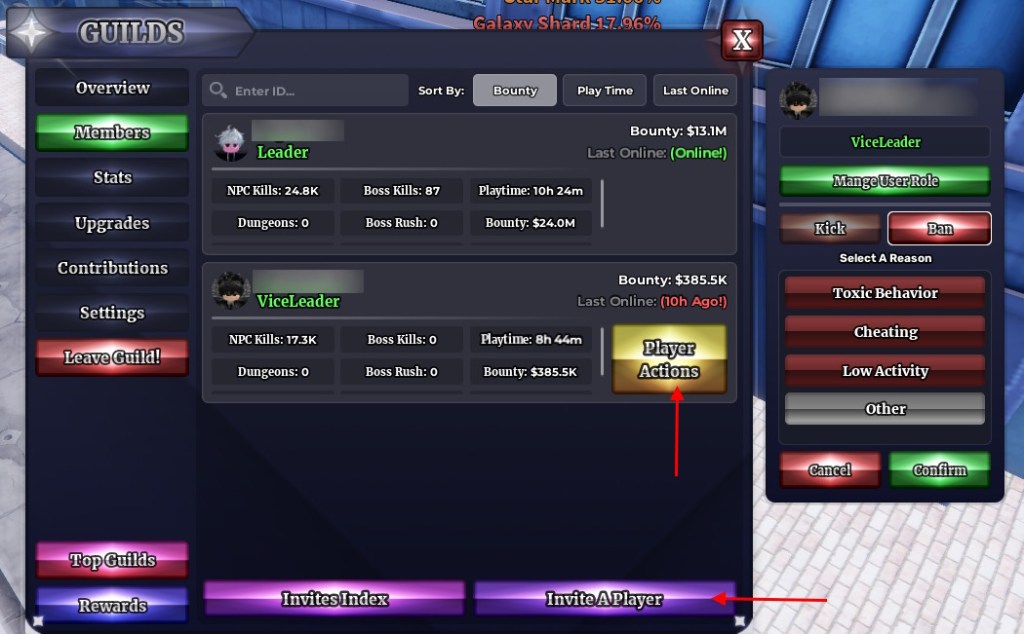
Under the overview section, you will find the members tab. Here, you can take player actions on individual members. This includes kicking members or even permanently banning them. You can also manage user roles and give them different roles.
Moreover, you can check the invites or even invite players from this same menu. The members’ list also shows what other players are doing to earn guild points.
Stats and Guild Points
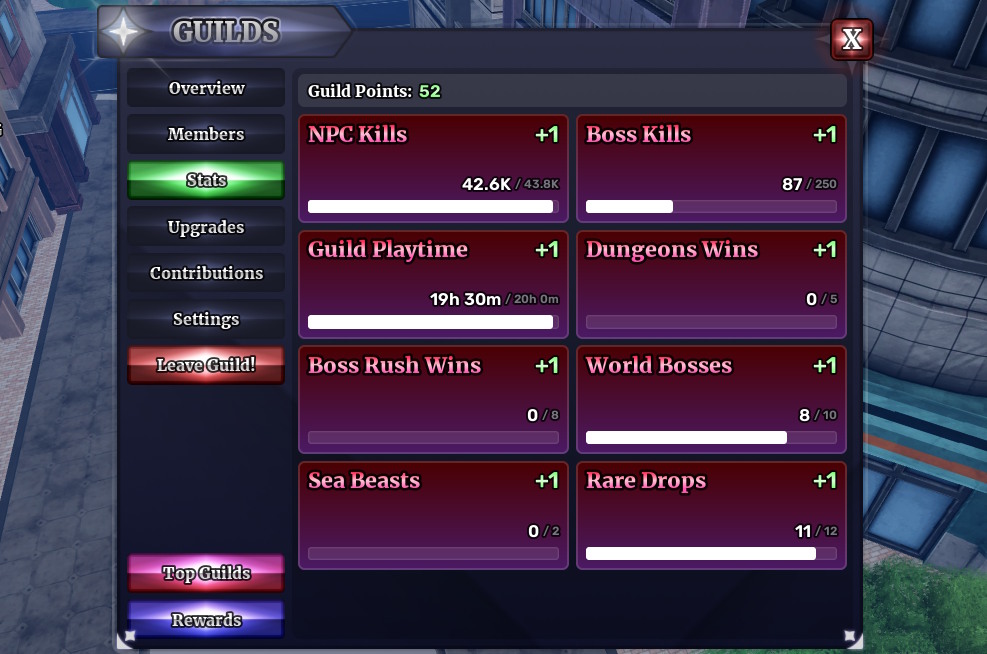
In the stats tab of the Guild menu of Sailor Piece, you will find the objectives that give Guild Points. NPC kills, Guild playtime, dungeon wins, defeating Sea Beasts, and more are the tasks that give Guild points.
Guild Point Upgrades
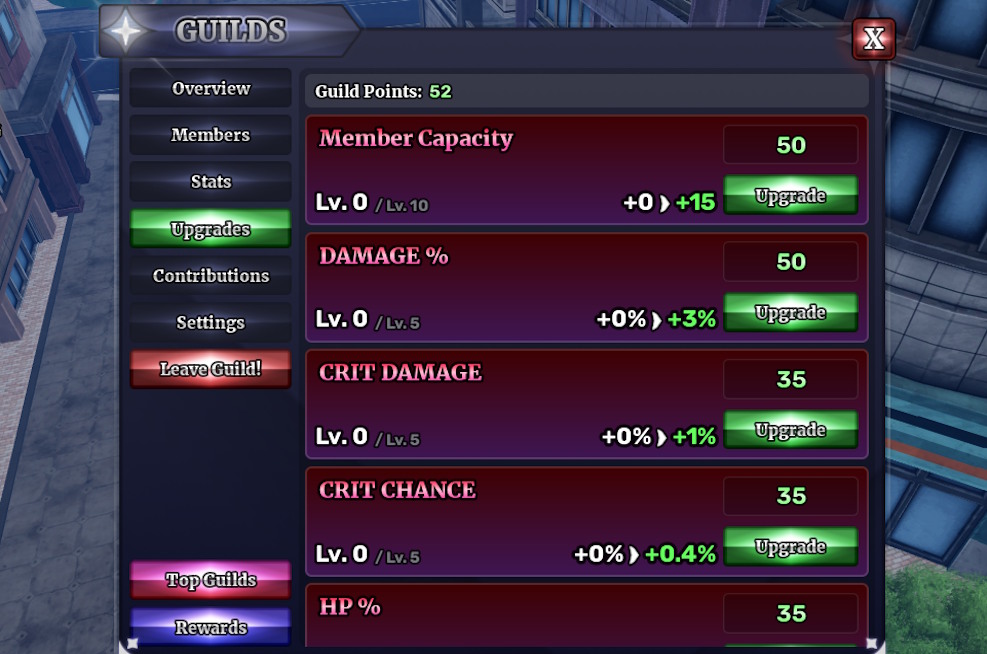
One of the key reasons to join a Sailor Piece Guild is the upgrades. From the upgrades tab, you can unlock buffs for all members of the guild. Here are the stats you can upgrade using the Guild points in Sailor Piece:
- Member capacity
- Damage
- Crit Damage
- Crit Chance
- HP
- Luck
Contributions
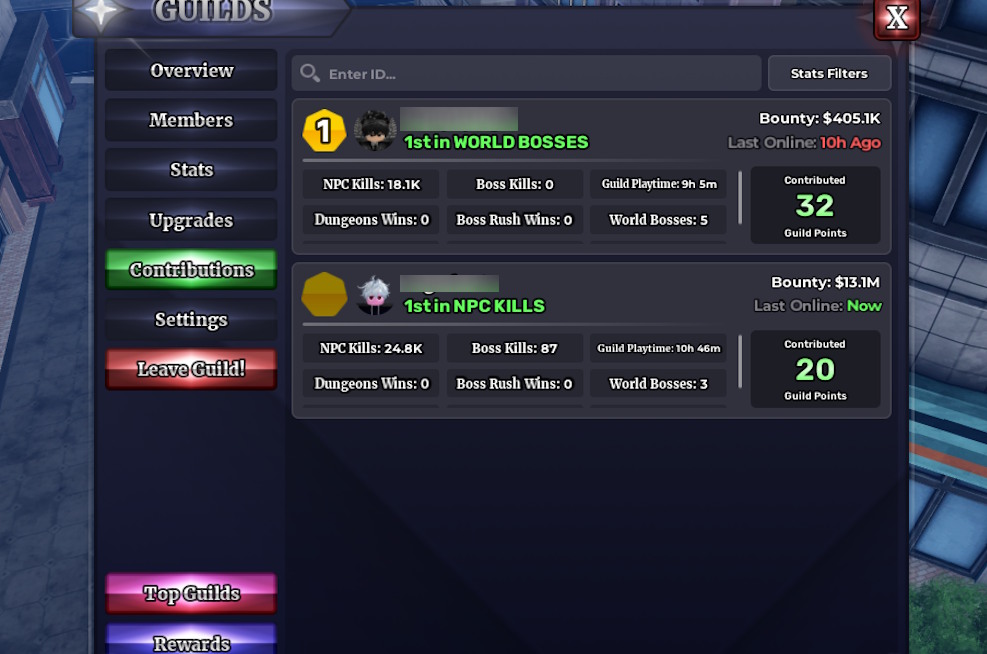
If you think some members of your Guild are enjoying the fruit that others sow, check the contributions tab. Here, you will find the amount of points each member is earning for the Guild.
Settings and Admin Actions
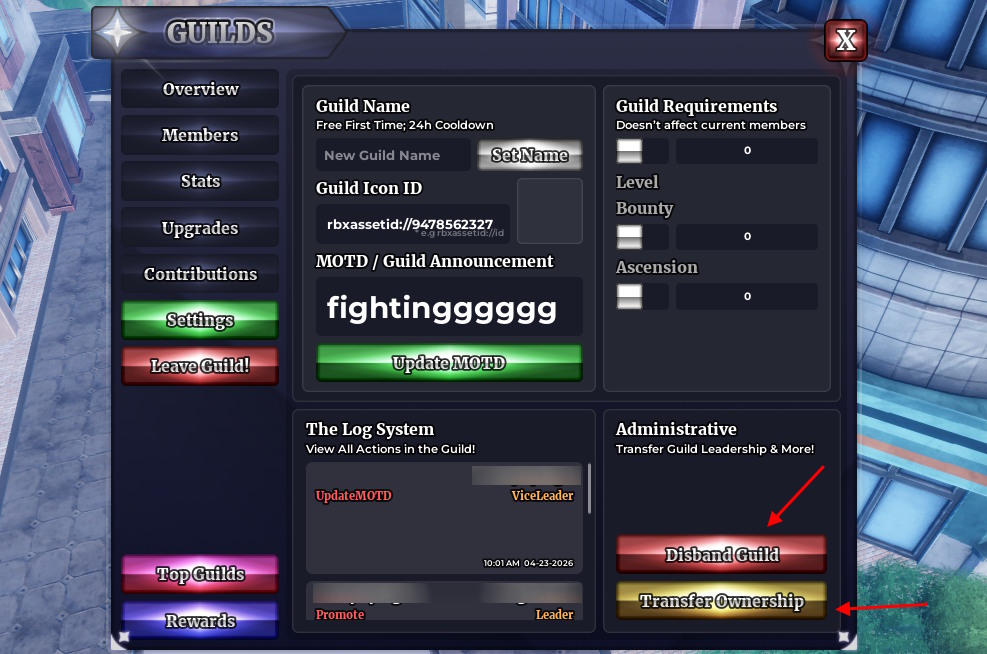
If you are a leader or have admin permissions of a Guild in Sailor Piece, the settings option is for you. From here, you can perform these actions:
- Change name and icon: From the settings menu, you can change the Guild Name for free for the first time. After that, it goes on a 24h cooldown and requires a Guild Key from the next time. You can also change the icon by changing the icon ID.
- MOTD/ Guild announcement: Use the MOTD/ Guild announcement section to type the announcement. Click Update MOTD to change it.
- Guild requirements filter: You can use the Guild requirements section to filter who can join your Guild. This includes level, bounty, and ascension limiters.
- Disband Guild or Transfer Ownership: By using the Disband Guild option, you can delete the group. If you want someone to take the leadership role, use the Transfer Ownership option.
How to Leave a Sailor Piece Guild
Once you want to leave a guild, click the ‘Leave Guild!’ button from the Guilds menu in Sailor Piece. Remember that your upgrades will remove immidietly after leaving the Guild.
Sailor Piece Guild Rewards
In Sailor Piece, you can earn points to climb Guild Leaderboards. These are available through tasks you perform with other members of the guild. It is divided into the top 1-100 guilds.
For being one of the top Guilds, you will get rewards and prestige. You can check all the top Guilds from the Guild menu. Click the Top Guilds button to check the leaderboards in Sailor Piece. You can also click the Rewards button to find out all the rewards.
| Position | Rewards |
|---|---|
| Top 1 | Title: S1 #1 Unveil, Aura: Unveil Aura, Cosmetic Crate x500, Aura Crate x500, Secret Chest x500, Bloodline Stone x5000, Clan Reroll x60000 |
| Top 2 | Title: S1 #2 Glory, Aura: Glory Aura, Cosmetic Crate x250, Aura Crate x250, Secret Chest x400, Bloodline Stone x2500, Clan Reroll x45000 |
| Top 3 | Title: S1 #3 Creed, Aura: Creed Aura, Cosmetic Crate x150, Aura Crate x150, Secret Chest x300, Bloodline Stone x2000, Clan Reroll x35000 |
| Top 10 | Title: S1 #10, Aura: S1 Top 100 Aura, Cosmetic Crate x100, Aura Crate x100, Secret Chest x100, Bloodline Stone x1250, Clan Reroll x25000 |
| Top 25 | Title: S1 #25, Aura: S1 Top 100 Aura, Cosmetic Crate x75, Aura Crate x75, Secret Chest x50, Bloodline Stone x750, Clan Reroll x15000 |
| Top 100 | Title: S1 #100, Aura: S1 Top 100 Aura, Cosmetic Crate x50, Aura Crate x50, Secret Chest x50, Bloodline Stone x500, Clan Reroll x10000 |
That ends our Sailor Piece Guilds guide, including the steps to join or create one. So, have you entered any guilds in the game yet? Let us know in the comments below.
To create a guild, players must be above 10000 level and have 1x Guild Key.
To get rewards, your guild must stay in atleast top 100 of the leaderboards.


















 Matthew Wilkins