Practical Basketball is quickly becoming one of the most popular basketball games on Roblox thanks to its skill-based gameplay, deep build system, and competitive online matches. Whether you want to learn advanced dribble moves, improve your shooting, or stay on top of every update, the game’s official community channels are the best place to start. So, here are the official Practical Basketball Discord server and Trello board links you need before jumping onto the court.
Official Practical Basketball Discord Server Link
You can join the official Practical Basketball Discord server using the official invite link shared by the developers. The Discord server, called Practical’s Games, is where every major announcement, update, and community event is posted first. It is also one of the best places to find teammates, report bugs, and discuss builds with experienced players.

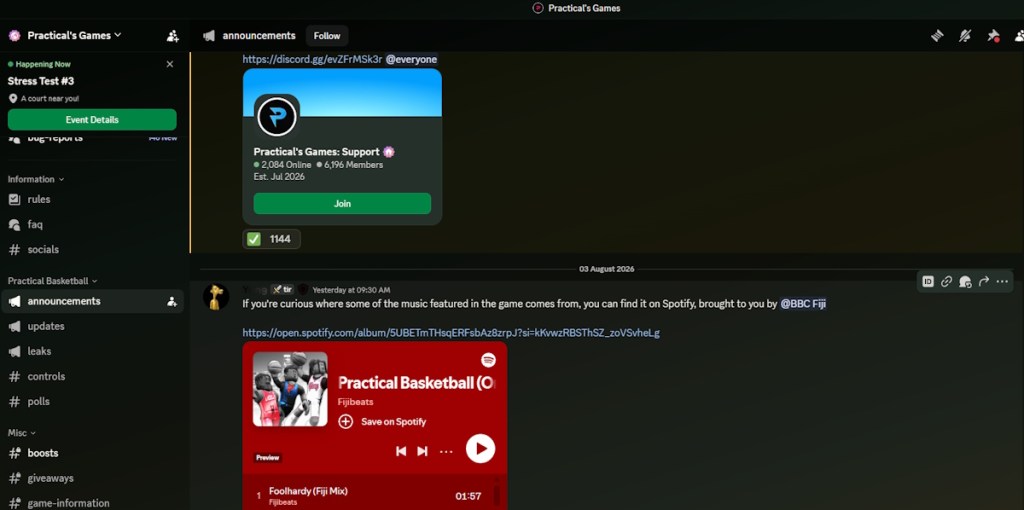
The server is organized into multiple sections, making it easy to find exactly what you need. The Information area includes game information, rules, giveaways, boosts, official links, and announcement channels. This is also where you’ll find update news, event announcements, and other important messages from the developers.
The community side of the server is just as active. There are dedicated text channels for general chat, media sharing, content creation, and bot commands. If you prefer talking instead of typing, the server also includes several public voice channels where players regularly team up, practice, and discuss strategies.
If you’re looking to improve your gameplay, the Discord is easily the best resource available. Experienced players frequently answer questions about controls, builds, badges, and mechanics, making it much easier for new players to learn the game than figuring everything out alone.
Does Practical Basketball Have an Official Trello?
At the time of writing, Practical Basketball does not have an official Trello board. Many Roblox games use Trello to document mechanics, progression systems, and detailed guides, but the developers have not released one for Practical Basketball yet.
For now, the official Discord server for Practical Basketball serves as the primary source for game information, patch notes, and developer communication. We’ll update this guide as soon as an official Trello board becomes available.
Why Should You Join the Practical Basketball Discord?
There are plenty of reasons to stay in the official Practical Basketball server:
- Get update announcements before they reach Roblox.
- Find the latest Practical Basketball codes as soon as they are released.
- Read patch notes and developer posts.
- Learn builds, controls, and gameplay mechanics from experienced players.
- Report bugs and provide feedback directly to the developers.
- Join voice channels to find teammates for competitive games.
- Participate in giveaways, community events, and future testing sessions.
That’s everything you need to know about the Practical Basketball Discord server and Trello board. If the developers launch an official Trello in the future, we’ll update this guide immediately so you always have the latest links.
The official Practical Basketball Discord server is the best place to find update announcements, patch notes, events, and newly released codes.