- GTA 6 lets you listen to different radio stations while driving or exploring Leonida.
- Hold Left on the D-pad to access the radio stations in GTA 6 while inside a vehicle.
- You can turn the radio on or off using X on PS5 and PS5 Pro and A on Xbox Series X|S.
- You can choose to turn on the radio automatically when entering a vehicle in the GTA 6 Audio settings.
Exploring Vice City and the rest of Leonida in GTA 6 is even more enjoyable when you have your favorite music playing in the background. The game features multiple radio stations with different music genres, but you might not immediately know how to access them or switch between stations. So, here’s how to turn on the radio, change stations, and turn it off in GTA 6.
How to Turn On the Radio in GTA 6
You can turn on the radio in GTA 6 by holding Left on the D-pad while inside a vehicle. This opens the radio selection menu, where you can choose a station and start listening to music. The controls work the same way on PS5 and Xbox Series X|S. Here’s what you need to do:
- Enter a vehicle: Get inside a car, bike, boat, or aircraft that supports the radio.
- Open the radio menu: Press and hold the Left button on the D-pad to bring up the radio station wheel.
- Turn on the radio: Select a radio station and press X on PS5 or A on Xbox Series X|S to turn it on.

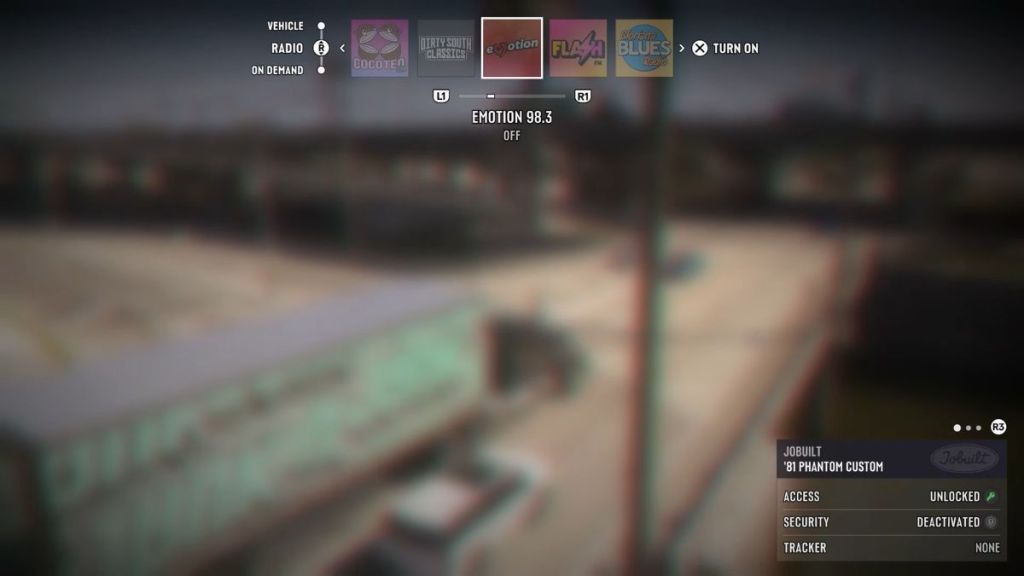
You have now turned on the radio in GTA 6. The same controls also work with radios found in certain buildings like safehouses and other locations across Leonida.
How to Turn on GTA 6 Radio Automatically When Entering a Vehicle
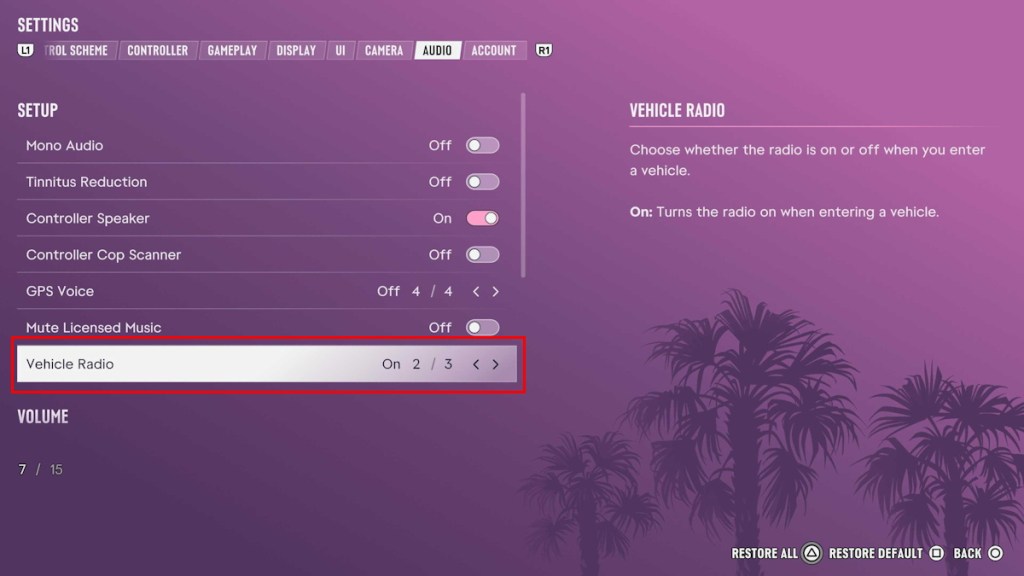
You can also make the radio turn on automatically whenever you enter a vehicle. To do this, go to Settings -> Audio -> Vehicle Radio under the ‘Setup’ section. Here, select the ‘On’ (2/3) Vehicle Radio option. This saves you from manually selecting a station every time you get into a car.
How to Change Radio Stations in GTA 6
If you don’t like the song currently playing, you can switch to another radio station in GTA 6 without leaving your vehicle. Simply hold Left on the D-pad to open the radio menu.
While holding the button, press L1/R1 on PS5 or LB/RB on Xbox Series X|S to cycle through the available stations. Alternatively, you can use the right analog stick to select a station directly from the radio wheel.
Once you’ve found a station you like, press X on PS5 or A on Xbox Series X|S and release the D-pad button to start listening. You can repeat this whenever you want to explore the different music genres and broadcasts available in GTA 6.
How to Turn Off the Radio in GTA 6
You can also turn off the radio if you want to drive around Leonida without listening to music. To do this, hold Left on the D-pad to open the radio menu, then press X on PS5 or A on Xbox Series X|S to switch it off.
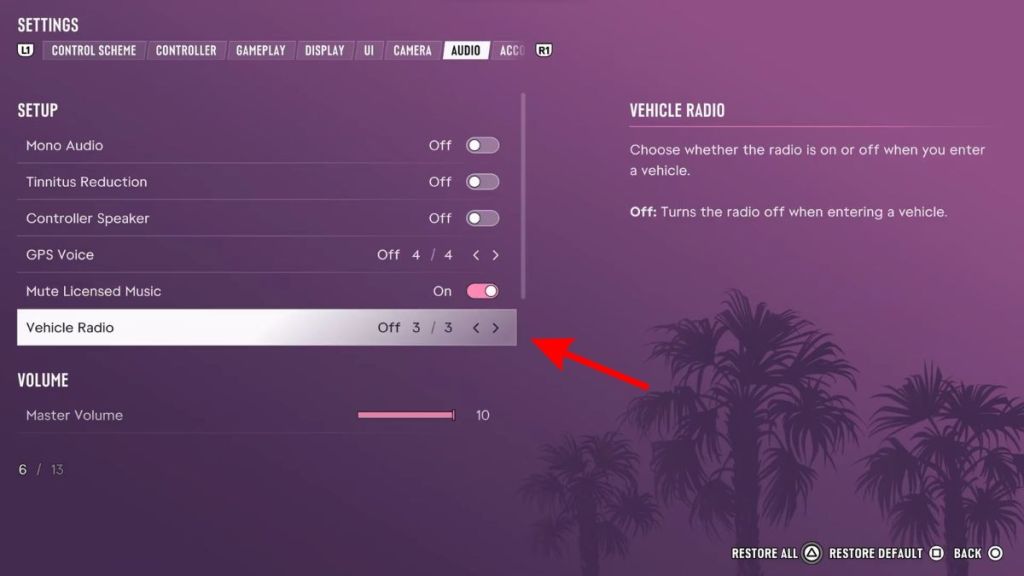
If you don’t want the radio to start automatically in vehicles, go to Settings -> Audio -> Vehicle Radio and select Off (3/3). You can still manually turn the radio back on whenever you want to listen to music.
So, whether you’re driving around Vice City or relaxing at your safehouse, you can tune in to your favorite music whenever you like. You can even listen to music while walking in GTA 6 by buying and equipping headphones or earbuds.