Update: checked for new Dig and Clean codes on September 1, 2026
Ever since I played Dig on Roblox, I have looked around for a much simpler take on a digging game, and that is exactly what Dig and Clean on Roblox offers. You detect items, dig them, clean them, and sell them for a fortune. To help you out in the game, we have listed all the exclusive Dig and Clean codes below that give a free luck boost and other rewards.
All New Dig and Clean Codes
- UPDATE3: 2x Luck for 30 Minutes (NEW)
- UPDATE2: 5 Instant cleans (NEW)
- UPDATE1: 2x Luck for 30 Minutes (NEW)
- SECRET10: 10x Luck for 10 Minutes
Expired Dig and Clean Codes
No, there are no expired codes in this game yet. The developers introduced codes with the update 1.
For the fans of such exploration-type games, Roblox has a handful of experiences like Fisch, Cut a Gem, and even Axe RNG. But for the ones who love a bit more challenge, we have a Roblox codes master list with the top cool games.
How to Redeem Dig and Clean Codes
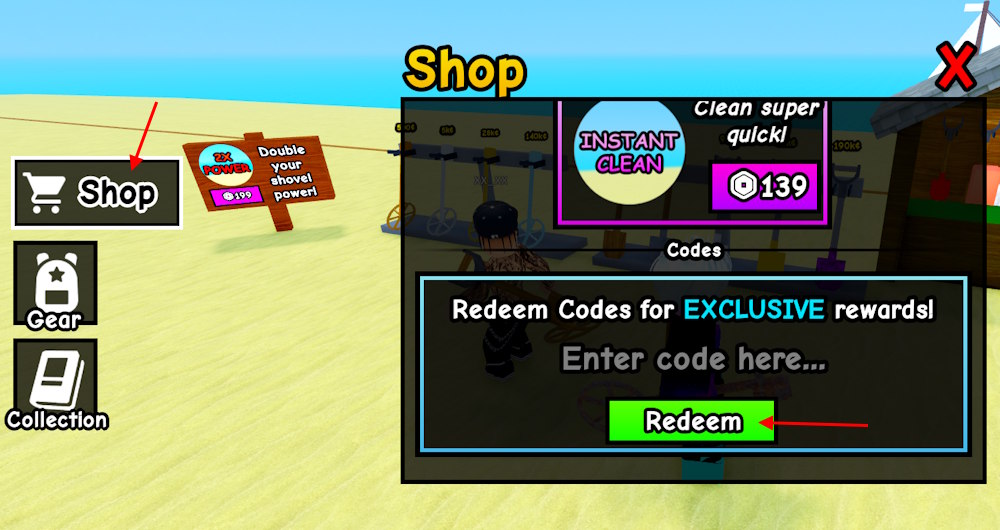
To unlock the shop and code system, you must complete the tutorial first. Once done, follow these steps to redeem the codes for Dig and Clean:
- Launch Dig and Clean on Roblox.
- Click the ‘Shop’ button from the left menu.
- Type a working code and click the Redeem button.

How to Get More Dig and Clean Codes
If you are looking to stay on top of the latest codes for Dig and Clean, we are your safest bet. We regularly go through the fresh announcements on the Dig and Clean servers so nothing is missed. Just bookmark this page and revisit for the exclusive codes.
For the ones who prefer checking codes instead of playing the game more, the Discord server is the only option. Join the Dig and Clean Discord server and keep an eye on the codes channel. Beware, the developers share some codes in-game too, which can make you miss a few.
Why Are My Dig and Clean Codes Not Working?
Make sure you complete the tutorial first, as it unlocks the redemption section. If you are still running into issues, check if the code is properly inserted and the servers are up. We suggest you copy the code using the button from our list. As for the servers, create a private one or wait till the developers restart them.