Deadlock has finally released the highly anticipated content update, naming it ‘City Never Sleeps’. This update adds multiple new heroes, completely changes the map, adds multiple new objectives, and much more. If you are excited about the update and want to know everything about it, here are the Deadlock City Never Sleeps patch notes.
Deadlock City Never Sleeps Patch Notes Highlights
The Deadlock City Never Sleeps update brings a ton of new things. Make sure to check our Deadlock tier list to learn more about the game’s meta. Before you read the entire patch notes, here are some selected highlights for you:
- Six new heroes: The update adds six new heroes, unlocked over time based on votes.
- Complete map overhaul: Most of the map has been changed, including neutral enemies.
- Four new locations: Four new districts have been added to the map with new enemies and things to do.
- Two new objectives: The update adds two objectives on the map, in the two new districts.
- Cursed Item Shop: A new cursed item shop has been added that can corrupt your items, adding debuffs and severely increasing their other stats.
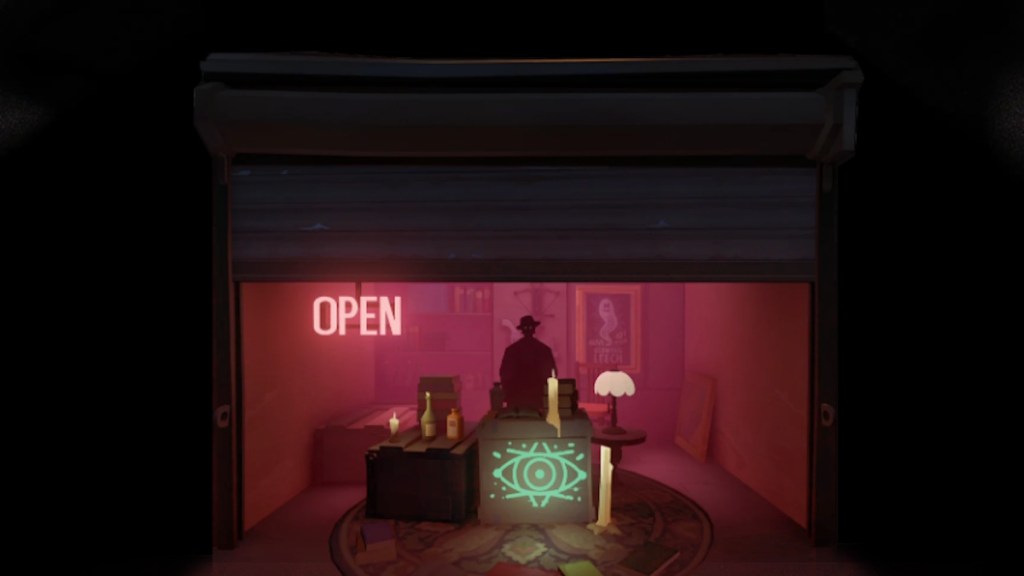
Six New Deadlock Heroes
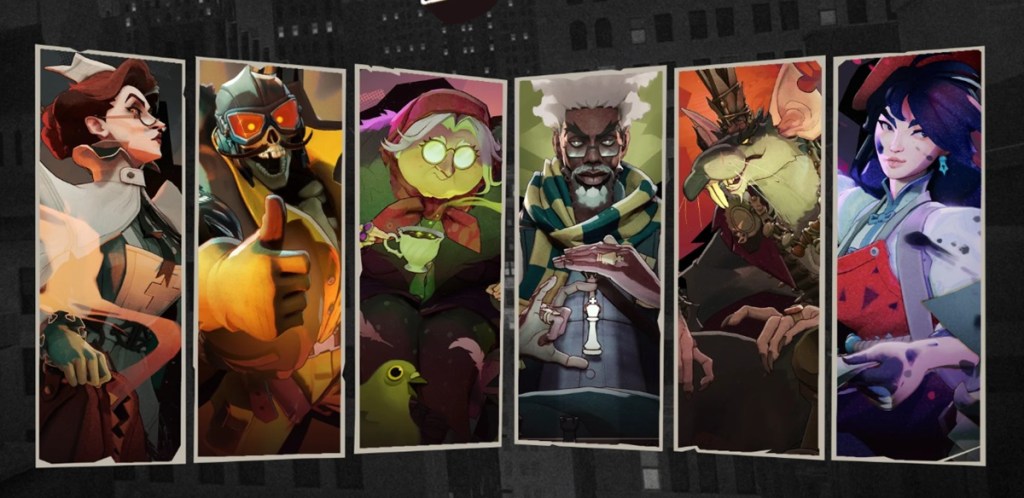
Like the last Deadlock major content update, this time the developers have added six new heroes as well. And with it returns the voting system. All voting is now done in the new pregame lobby. Convince your allies to make the only correct choice. The winning team’s votes will count as double. With that said, here are the new heroes:
- Nurse Harrow: Strict, Terrifying, Savior
- Rat King: Scrappy, Regal, Tencious
- Solomon: Strategist, Focused, Checkmate
- Deadman Danny: Reckless, High-Flying, Explosive
- Baba: Cackling, Beady, Hexing
- Violet: Ambitious, Nimble, Creative
Deadlock City Never Sleeps Patch Notes Map Updates
The map received the biggest update yet in the new Deadlock patch notes, completely changing the visuals and neutral enemies. Take a look below to learn about all the changes.
Broadway — Blue Lane
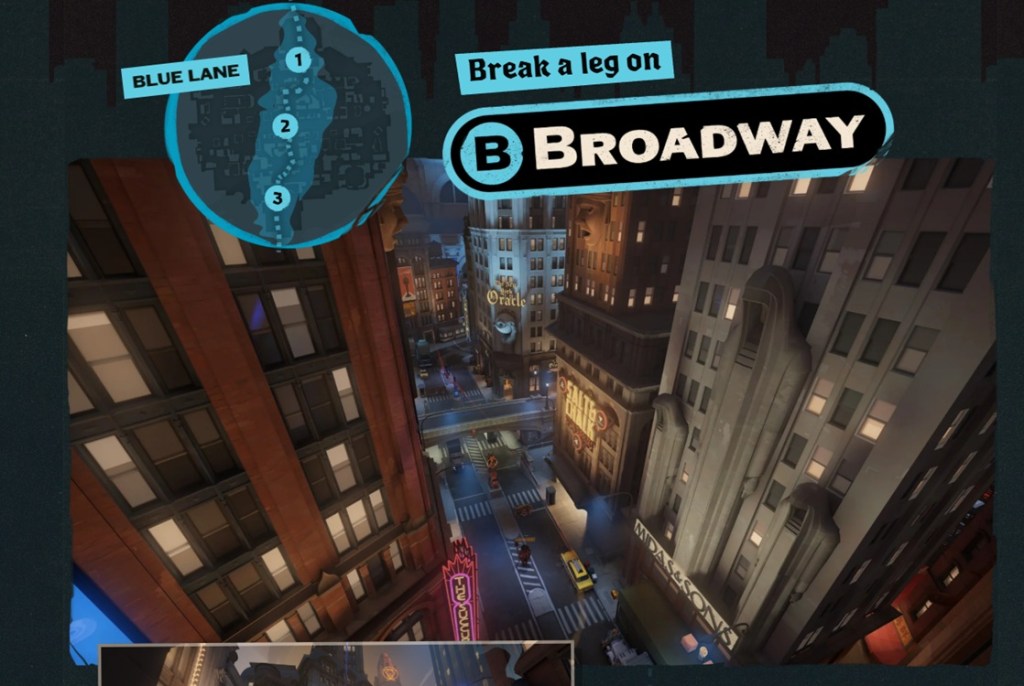
- Uptown: Our first stop on the tour. If you need to get going somewhere, this is your quickest route to where the action is.
- Times Square: The beating heart of the city. Everyone should see it at least once in their life, and hopefully not just this once.
- Downtown: The busiest stop in town. Citizens of the Cursed Apple have been reporting strange rumblings coming from deep beneath the subway line.
Greenwich — Green Lane
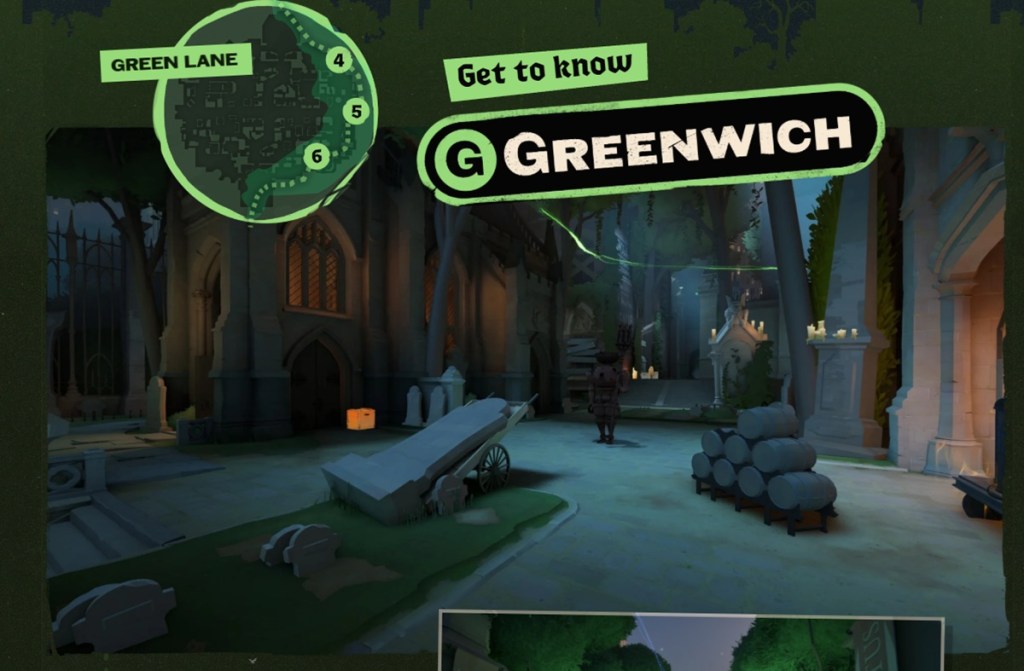
- Umbria University: Home to the nation’s finest Bibliomancy program, Umbria offers an elite occult education.
- Central Park: 300 years old and still growing. This aptly named Hangman’s Elm has been in the city longer than almost any other living creature.
- The Brownstones: Visit the Brownstones for some quality family time, and if you’re lucky, a history lesson worth not repeating.
York — Yellow Lane
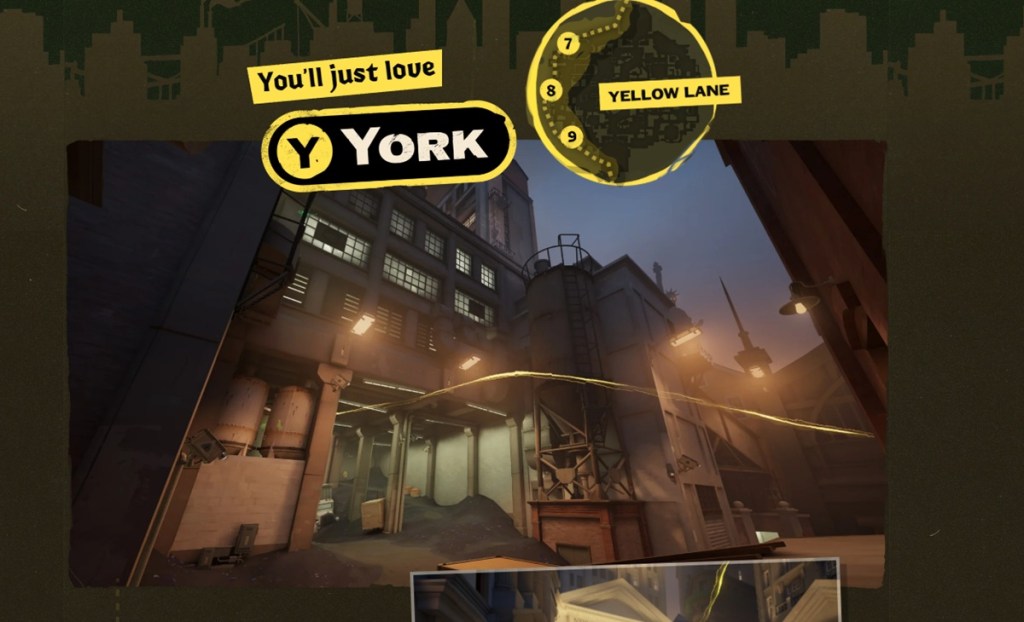
- Stock Exchange: See the high-stakes financial playground where the warlocks of Wall Street ply their trade, making trades.
- Seaport Dock: Preserving New York City’s maritime heritage hasn’t quite been the same since this vessel docked at Pier 16.
- Old Fairfax Factories: The beating heart of the Occult Industrial Complex comes from humble beginnings.
The 4 Districts
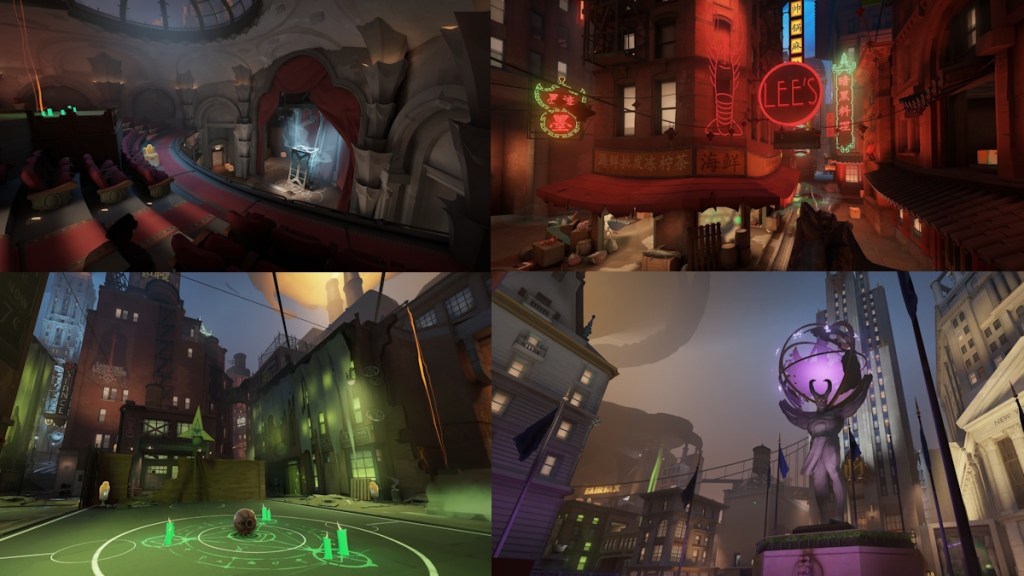
The Deadlock patch notes also add four new Districts in the Deadlock map. These locations have different-looking neutrals and have plenty of small objectives to fight for. Here are the new districts:
- Theater
- Chinatown
- Haunted Lot
- Plaza
New Objectives
- Bell Tower: Ascend to the top of the Chinatown Bell Tower for a highly concentrated soul hotspot. Keep in mind that while collecting your rewards, the bell will ring loudly throughout the map. Found in the Chinatown district.
- Plaza: Shrouded beneath this district’s main square lies the city’s Sunken Plaza. With high risk comes high rewards because as you descend to its depths, the sounds of the outside world fade away along with your stamina.
New Neutrals
- Specimen: Some call it magic, others call it science. It doesn’t matter what you call it when it’s a disembodied hand crawling on your kitchen floor in the middle of the night.
- Past Dues: A good story can bring respite in trying times. For those less inspired, the pages of a book may serve better as a sleep aid.
- Gutter Ghouls: All those dark and dirty thoughts that humanity would prefer buried and thrown away, given form.
- Barrel Mimics: Gunpowder was originally invented while on the search for an elixir of immortality. The spirits seem to make good use of both.
- Stage Hands: Graceful bodies floating across the stage can be mesmerizing. In such a historic theater, one couldn’t be blamed for wanting to leave their bloody mark all the way across the deck.
- Crabbage Pots: People always tell you there’s something in the water whenever anything bad happens. There’s a ritual going on outside. Something’s in the water.
- Festival Spirit: Souls are kindled with hopes and dreams of the wishes they may light into day. You never think about how some of those hopes and dreams are violent and want to kill you.
- Shrooms: New York is a melting pot of families from across the globe. It just so happens that when you combine a family of fungi and demonic energy at high temperature, it starts to walk.
- Underhands: Grasping hands always find their way into unexpected pockets. While the ritual burns high in the sky, some decrepit souls can’t help but stay low.
Secret Shop — The Broker
New secret shop, The Broker, has been added to the game. He will only be available for a limited time, until the first new hero is released in this update.
- Exchange Your Items: While supplies last, you can exchange your high-tier items for a Corrupted version. While his exact arrival time varies, his first shipment is stocked in around 30 minutes. Additional Corrupted Items can be collected, on average, every 15 minutes after that.
- Negative stats: Each match, all corrupted items are assigned random negative attributes from a predefined set. The degree of negative and positive attributes has a small amount of variability; however, they are the same for all players in a given game.
- Spawn: Corrupted Items are banned on the streets of New York. He’ll only be around for a few days, as authorities will be out in full swing once the first new hero makes their arrival.
Miscelenous
- Tough Crates: These Tough Crates require a Heavy Melee to break open, but the extra souls will make it worth your while.
- Buff Containers: Revamped golden statues now also include Spirit Resist, Bullet Resist, Ability Range, and Move Speed as permanent bonuses.
- Healing Snacks: Hidden around the map, these healing snacks allow keen-eyed players to heal up in a pinch.
- Steam Vents: Duck in and out of veiled cover with your team to navigate the city streets in refreshing secrecy. Provides invisibility and a small amount of regen while standing on it.
Deadlock City Never Sleeps Patch Notes UI Updates
- New Health Bar:
- Will include Player names
- Rejuvinator indicator
- Ultimate indicator
- Critical Health Status, Stamina Tracking
- Current Health Value
- Neutral Information
- Objectives Information
- Damage Number options.
- HUD Enhancements:
- Ally Indicators: You can now more easily see your allies, no matter how far away they are.
- Improved Stats: Gain a better understanding of your power level throughout a match. Provides a quick view of your relative investments and lets you see more clearly when you hit your spike.
- Better Combat Awareness: Get a clearer picture of how your stats are impacted in the heat of battle.
- Shop Stats: While shopping, see the impact of your purchases in real time.
- Build-ups and Durations, Under Your Thumb: You’ll be able to see that pesky Love Bites build-up more easily.
- Targeting Mode: A cleaned-up targeting mode means less UI getting in the way between you and your prey.
- Event Feed: A new way to look at important moments during a match.
- Killing Blow Information: The Event Feed now displays a breakdown of what Item or Ability landed the killing blow.
- Bounties: Players can now see what the full bounty of a target is, as well as their personal share of the kill.
- Soul Bags: Don’t forget to secure the Soul Bag from your kills, before your ally does it for you.
- The Shop:
- Popular Items: Not sure what is trending on your hero? Using live player data, the shop now narrows down the options to their most frequently purchased items. The item tooltips include how often the item is purchased and at what phase of the game.
- Item Filters: Filter the shop down to only see the stats that you’re looking for. Mix and match filters to enhance your build with the stats and modifiers you want the most.
- Build Improvements: Updated Build Browser Interface for better previews, Build Copy/Pasting, Instant Category Resizing, and many other bug fixes and QOL improvements.
- Shop Settings: Improved shop search, focus, scrolling, new options and overall navigation. Pressing 1-6 by default in the shop will navigate to different shop tabs.
Deadlock City Never Sleeps Patch Notes: Pings & Communication
- Minimap Wheel: Expanded interactive map pings.
- Topbar Wheel: Say more things about the heroes in your match.
- Ability Ping Information: Detailed dynamic ability pings to track important cooldowns.
- Typing Indicator: Let your allies and enemies know what’s on your mind.
- New Pingable Targets: Troopers, Neutrals, Ziplines, Rift, Bridge Buffs, Shop, and more now react to pings.
- Updated Ping Lines: Over 15,000 new and updated pings.
- Item Pinging: Ping items in the shop to indicate your intent to buy them, or signal to others that you’ve already bought the item.
- Enemy Ping Information: Relay important information about enemies like their critical health, death status or if they are about to respawn.
- Clustered Minimap Enemies: Pinging an enemy in a cluster on the minimap will now call out the quantity of enemies there.
- New Voice Lines Added: Pre-match conversations between new and existing heroes increased from over 700 to 1500. Added over 10,000 non-ping voice lines.
- New Dialogue Player: Browse and listen to all of the available VO in the game from your favorite Heroes and Patrons.
- Commends Counter: A convenient way to see your tally after each match. Clicking on a hero commends that player back.
- Trooper Improvements: Improved trooper behavior, animations, and performance.
- Minimap Location Label: Callouts for each Lane and District on the map.
- New Veils: Updated rendering and VFX for veils around the map.
- Updated Barrier Treatment: Barriers applied to yourself have a cleaner look.
- Parry Cooldown: While your parry is on cooldown, it is now displayed near your reticle.
- In-World Respawn Timers: You can now see when Haunt camps or Midboss will respawn when you are near their spawn area.
- Topbar Midboss Timer: The Topbar now shows a timer for Midboss respawn.
- Permanent Buffs: Added a postgame graph to track all permanent buffs players collected during the game.
- Expanded Custom Lobbies: Expanded parties to support 8 spectators in custom lobbies
- Custom Hideout Camera: Zoom out for a better look at your hero.
- Overhead Buff Display: Picking up a permanent buff now displays the pickup type above your hero.
- Enemy UI Color: Modify the colors used for certain elements in the UI.
- VO Subtitles + Customization: When enabled, subtitles will appear for in-game dialogue. Players can also customize the size, colors, and font.
- Auto Move: Double-tap Move Forward to keep moving forward without holding the key. Move Forward or Move Back to stop.
- Auto Mantle: Automatically mantle onto ledges you walk into while moving forward on the ground, without pressing Jump. Works the same while moving backward.
- Auto Fire: Your weapon fires continuously without holding Fire. Press Fire to stop shooting, and press it again to resume.
- Reduced Camera Shake: Reduce camera shake from impacts, explosions, and other effects.
- Reticle Updates: Customize the fill and border colors.
Deadlock City Never Sleeps Patch Notes: Advanced Tools
- Bot Recording: Record and playback bot actions for easier testing.
- Easier Bot Testing: Record and playback your bot actions to test more complex behavior.
- Loop Bot Recordings: Have your bot endlessly loop your recorded sequence of actions.
- Share Recordings: Easily share your bot recordings online and with friends.
- Combat Log: Detailed breakdown of actions you’ve taken against a bot.
- Track Damage Events: See an exact breakdown of every damage instance and type dealt between you and your target.
- Buffs and Debuffs: See a clear list of all modifiers that were applied during combat.
- Speed Graph: Displays a real-time graph of your movement speed.
- Speedometer: Graph the differences in movespeed during varied combat scenarios and movement techniques.
- Mobility Tracking: Learn how different forms of CC exactly affect your hero’s movement.
- Map Routing: Use this feature to test different routes around the city for the most efficient routes.
- DPS Meter: Shows your DPS and total damage dealt.
- Track Your Damage: Combat ends 3s after your last hit, and the result stays on the screen until you deal damage again. Shows your DPS and Total Damage dealt.
- Comparing Builds: Test out and compare different builds to optimize your choices.
- Hero Controls: Numerous new options to set your hero’s state for testing.
- Camera Lock: Move the camera around your hero freely to capture the right moments.
- Bot Fine Tuning: Set various attributes on the target dummy for more precise gameplay testing.
- Hotkeys: Actions that you may want to toggle on and off quickly, like no-clip, can now be bound to keys within the testing tool.
- Tooltips: Added tooltips to all the options in the sandbox for clearer results.
- Menu Pin & Free Cursor: Keeps the testing tools on screen after you let go of the scoreboard. Toggle unlocked cursor for persistent mouse control.
- Map Spawn Toggles: Turn regular map spawns on or off while testing.
- Hide Interfaces: Hide the UI and Health Bars for capturing the content you want.
- Force Spawn Menu: Force spawns for different objectives, breakables, enemies, and more.
- Navigate Uninterrupted: Make everything in the map ignore your hero and give your hero a speed boost.
- Reorganized Layout: Testing tools got an organizational revamp to make it easier to find what you need.
- Falloff Guides: Show where your weapon damage starts to fall off, and where it drops off. See how much damage is reduced when firing.
- Permanent Buffs: Grant yourself permanent buffs through the testing tools.
- Shop Modifiers: Show detailed information about item types like Enhanced, Legendary, and Corrupted.
- Target Actions: Kill or heal a target under your cursor directly.
- Bot Actions: Command your bot to perform actions, use abilities, or cast items for easier testing.
- Free Shopping Mode: Toggle free shopping mode on and off.
Deadlock City Never Sleeps Patch Notes: Updated Settings
- Additional Keybinds: Added keybinds for previously non-bindable actions.
- Hideout Customization: Added camera settings and keybinds to use while in the hideout.
- Bind By Key: Added a new way to set keybinds by clicking an available key and assigning a command.
- Share Your Setup: Added a button for creating and applying a shareable Deadlock settings code.
- Reticle Share Code: Added a simple single-reticle code sharing option in the Reticle settings section.
- Preview and Undo: Preview the settings from a code before applying it, or even undo the changes afterward.
- Spectating Keybinds: Cycle through players while spectating or watching a replay using customizable hotkeys.
- Free Cam While Paused: Spectator camera can now fly around while a replay is paused.
- Player View Toggle: Toggle whether the spectator camera turns back to the spectated player’s view.
- Fade Opacity Controls: Adjustable fade opacity and distance for the viewed hero and other characters when the camera gets close.
- Spectator Camera: Override the camera’s position, pivot, and field of view while spectating or watching replays.
- Health Numbers: Choose to display health numbers inside health bars.
- Cumulative Damage: Choose the way you see ongoing damage dealt to targets.
- Ally Health Numbers: Added an option to show health numbers on allied heroes’ health bars when they take damage.
- Improved Reticle Previews: Allow reticle pips to move as you fire, and let components react to zooming, accuracy effects, and hero abilities.
- Defaults Indicator: Individual settings now visually indicate when they have been changed from their default values.
- Device Recognition: Newly connected or disconnected speakers, headsets, and microphones now reflect immediately in the Settings menu.
- Hero Settings: Numerous settings can now be customized on a per-hero basis. Hold TAB in the Settings menu to highlight them.
- Mouse Cursor Size: You can now customize the cursor size.
- Settings Memory: The menu now remembers where you were across play sessions and reopens your most recent location.
- Individual Setting Resets: Individual settings now have reset buttons when they have been changed.
- International Keyboard: By default, or when auto-detect is selected in the dropdown, we attempt to determine the user’s actual keyboard shape and layout and represent it.
- Scroll Wheel Binds: Added support for mouse scroll wheel binds for previously button-down-only keys.
- Preview Video Settings: New option to preview video changes instantly, making the settings menu briefly transparent so you can see the effects of the new configuration.
- Global Settings Reset: A new global settings reset popup allows you to reset all settings or pick and choose which ones to reset in one go.
- IME Support: Users playing in Japanese, Chinese, or Korean can now use IME input to type text to highlight heroes.
- Hero Selector: The Settings menu now has a hero selector in the nav bar, making it easy to cycle between heroes to compare or adjust their settings.
- Cloud-Save Settings: Numerous settings that were previously not cloud-saved are now being saved so they can be persistent across different machines. Multiple players from the same PC can now have different settings.
- Improved Color Selection: Individual red/green/blue color sliders have been replaced by color spectrum sliders with color pickers that allow fast and easy color customization.
Deadlock City Never Sleeps Patch Notes: Additional Update Notes
- Updated engine code to the latest version of Source 2
- Improved anti-cheat
- Network prediction improvements
- Rendering performance improvements
- Audio performance improvements
- Localization additions and improvements
- Updated item art
- New SFX for all hero Heavy and Light Melee
- Ability/Item use is now instant the moment the button is pushed instead of waiting for the next ‘window’ which could make the button feel unresponsive
- New and improved SFX
- New death, respawn, and killstreak music tracks
- Various updated animations across old heroes
- Numerous Sinclair bug fixes
- New footstep sounds for Billy, Mina, Drifter, Silver, Victor, Venator, Apollo, Graves, Celeste, Doorman, Paige, and Rem
- New drop shadows that go directly down rather than through the sunlight. Improves performance and also helps you track enemies better.
- Added options for rebinding the Avoid Hero command for players using a mouse without a middle button.
- Street Brawl grants you a corrupted item after the item draft in Round 5
- Street Brawl bug fixes
- New hit registration effects
- Successfully parrying objectives no longer resets your Parry cooldown
- Sinners Sacrifice have variable timings to get the bonus
- Doorman bug and abuse cases improved
- Heroes will now look at points of interest in the Hideout
- Various response rule improvements/bug fixes for in-game VO
- Walkers no longer keep firing their fireballs after dying
- Fixed Yamato flying strike failing to create paths against targets that are solid to the player (Turrets, Shrines and Objectives).
- Fixed an issue where holding a modifier key like Ctrl to crouch would prevent other keybind chords from working
- Fixed an issue where secondary keybinds required the same modifier set for the primary keybind
- Bots now spawn facing the player
- Graves can now destroy Venator’s traps with her gun
- Dynamic Walker attack and stomp range indicator that appears as you get close instead of permanent ground displays
- Fixed Hidden King, Archmother, and Target’s minimap views not showing heroes or objectives while spectating a live match
- In both Sandbox and Explore, NYC has the first spawns on crates/neutrals at 5s instead of 30
- Added the various new objectives to the Sandbox Map.
- New point of view when spectating the Patron.
- Added support for Japanese kinsoku shori rules for line breaks
- Added localized hero logos for Korean
- Added an inset HUD option when playing in 21×9
- New settings options now show an indicator on the row until the new setting notification has been dismissed
- Added a pip to sliders in the Settings menu indicating the default value for that setting
- And many other misc changes…
So, that’s it. What’s your opinion on the game Deadlock City Never Sleeps update? Tell us about it in the comments section below.




 Sagnik Adhikary