Update: added new DBD codes on October 1, 2026
Finding the right drip can be crucial in the Dead by Daylight world. With this in mind, we have curated a list of active Dead by Daylight codes, granting you access to Bloodpoints, Rift Fragments, and even exclusive cosmetics. Bloodpoints can be used to level up in Dead by Daylight, while other DBD codes will help you with permanent cosmetics to wear on your escape journey from the deadly killer.
New DBD Codes Today (Limited-Time Rewards)
As of now, there are a total of 5 active codes that players can use in Dead by Daylight, which can grant them a variety of rewards like banners and free cosmetics. These codes include:
Active DBD Bloodpoint Codes
- ROADTRIP: “Dark Bomber” Torso for Shane Wiigwaas (NEW)
- STARSGUIDE: “Stardotter” Banner (NEW, expires October 10)
- PLAYXENOMORPHIN2V8: 200k Bloodpoints (NEW)
- MISSBEHAVIOURGC2026: “It Has My Face” Banners
- LIFEOFTHEPARTY: Party Dwight Figurine
DBD Codes that Never Expire
While Dead by Daylight has multiple codes that are available for a limited time, the title also has codes that persist throughout. This allows the community to enjoy charms and badges whenever they start playing, especially since the items are closely tied to representation.
Permanent Pride & Profile Badge Codes
- CAWCAW: Feathers of Pride Charm
- REDDIT1MIL: 8-bit Crow Profile Badge
- WARRIORPUPPERS: Warrior Puppers Charm
- LETSROLL: Dwight Charm
- PARTYHATS24: 4th and 5th year Anniversary crowns
- IFLOOKSCOULDCHILL: Frosty Eye Killer cosmetics
- PRIDE: Pride Charm
- PRIDE2022: Two Pride Charms
- FLAGL: LW Flag
- FLAGB: Bisexual Flag
- FLAGM: MLM Flag
- ISFLAG: Intersex Pride Flag Charm
- FLAGP: Pansexual Pride Flag Charm
- FLAGT: Trans Pride Flag Charm
- AFLAGG: Agender Pride Flag Charm
- AFLAGS: Asexual Pride Flag Charm
- GFLAGF: Genderfluid Pride Flag Charm
- NBFLAG: Nonbinary Pride Flag Charm
- GFLAGQ: Genderqueer Pride Flag Charm
- BDGPRG: Progress Flag Badge
- BDGPRIDE: Rainbow Flag Badge
- BDGL: Lesbian Pride Badge
- BDGM: MLM Badge
- BDGNB: Nonbinary Badge
- BDGGF: Genderqueer Pride Badge
- BDGB: Bisexual Pride Badge
- BDGP: Pansexual Pride Badge
- BGDT: Trans Pride Badge
- BDGGQ: Genderqueer Pride Badge
- BDGIS: Intersex Pride Badge
- BDGAG: Agender Pride Badge
- BDG2S: Two-spirit Pride Badge
- BDGPA: Polyamory Pride Badge
- BDGAR: Aromantic Pride Badge
- BDGAS: Asexual Pride Flag Badge
- BDGDM: Demisexual Pride Badge
- POLYFLAG: Polyamory Charm
- DEMISFLAG: Demisexual Charm
- AROMFLAG: Aromantic Charm
- TWOSFLAG: Two Spirit Charm
- KINDRD: Glance of Pride Charm
Expired DBD Codes
- GRASPINGTHEDARKNESS
- SHINEBRIGHT
- WORLDPRIDE2026
- MAURICEPRIDE
- ENTITYLOVEFORALL
- RAINBOWTOOLS
- INTOTHERAINBOW2026
- RAINBOWBRIGHT
- CROWCAW
- BIKERIDE
- KARMA
- KODOMONOHI2026
- COLOSSAL
- ENCORE
- COMEBACK
- JOKERSWILD
- HAPPYHORSEYEAR2026
- DBDBLUESKYJP
- 1MILLIONCROWS
- GALAXIES
- NIGHTSHIFT
- BOULETBROTHERS
- HAUNTED
- LOVEISUNHOOKABLE
- ESCAPEWITHPRIDE
- INTOTHERAINBOW25
- DEADBYPRIDE
- CARNANEVOA25
- DISCORD500
- THEENTITYLOVESALL
- LAFOGATA2025
- BPF2019
- HOOKEDONU
- ROLLD20
- LUCKYBP2025
- MAKEITREINDEER
- DBDDAY2024
- DBDDMAYOKE
- the dark lord
- PARTYHATS24
- CN600K
- DNDBD20
- PARTYHATS24
- THANKU24
- WHATISAMAN
- INTERSECTIONALIYAY
- PROUDDAVID
- PROUDSUSIE
- 100KSLAY
- KOINOBORI
- INFULLBLOOM
- BLOODFEST
- BLOODYGREAT
- DROPBP
- DROPMED
- DROPFL
- AMD
- KONTROLFREEK
- STEELSERIES2024
- DROPMH
- DROPMJ
- DROPML
- GOLDENDRAGON
- PAPERDRAGON
- LUCKYBP2024
- ALANWAKECHAPTER
- LIGHTSOUT
- UNDYING
- THANKYOUFOR60M
- GFUEL
- ELGATO
- STEELSERIES
- ALIENWARE
- DBDDAY39
- DBD10BIRTHDAY
- DbDDayR5
- DbDDay2022
- DANKE
- GAMSAHABNIDA
- BOOP
- BASTILLE23
- PARTYHATS
- OCANADA
- GETTHREADY
- TIKTOK
- TICKED
- TRAPPER7
- DBD7
- HAPPYGW2023
- MASTERMAKER
- NICE
- SHOPPINGSPREE
- NOTATRAP
- HONORARYCUSTODIAN
- HRVFANCLUB
- METMYMAKER
- LUCKYBP2023s
- LUCKY
- RABBIT
- ICEYYOU
- ONEMILLIONSOULS
- WINNERWINNER
- NOVAS
- CHEGADAS
- CELEBRANDO
- UNSTABLE
- VOID
- RIFT
- ENERGY
- DEDOBAJP2022
- THREEWITCHES
- DEDOBANOHI
- BILIBILI300K
- TOOTHFACE
- FINN
- SHARKY
- BUBBLES
- TWITCHRIVALSTW2022
- CAKEWALK
- IGBPPARTY
- BLOODBANK
- THANKYOU
- DOUBLERAINBOW
- GETTHATBAG
- BLUEBIRDBEEG
- 59th39
- 78SNOXXG
- AD800947-01A7-4DEF-81AD-40DDC501DE50
- ANNIVERSARYFRAGMENTS
- AUSOME
- BETTERTHANONE
- BILIBILI200K
- BOOP
- BULLSHIRT
- BYEBYE2020
- CAISHEN
- CIPHERSALAD
- DBDDAYJP2020
- DBDDAYJP2021
- DBDTHEBOARDGAME
- DBDWEBSITE
- DECIPHERSTRIKE
- DIEHARDDIVA2022
- DISCORD150K
- DISCORD200K
- DJC2021
- DWIGHTCROW
- EASYASABC
- ENTITYDISPLEASED
- ENTITYPLEASED
- ENTITYSLITTLEHELPER
- ETERNALBLIGHT
- FD3EB91E-B741-454B-A5DD-BC8DA406F162
- FORHONOR
- FRISKKUWURAWRXD2022
- FROSTYBLIGHT
- FROSTYDEATH
- FROSTYTWINS
- FUKUHAUCHI
- GIFTTHERIFT
- GIGXLM3G
- GOLDENBROS
- HALLOWHOOPS
- HAPPY1001
- HAPPYGOLDENWEEK2021
- HELLOTHERE
- HENYANG
- HISSANDHERS
- HOLIDAYFORMAL
- HOLIDAYSPECIAL
- HOHOHO
- INSERTCOIN
- INTHISECONOMY
- JAPAN300K
- KENPOUKINENBI2021
- KODOMONOHI2021
- LANTERNFESTIVAL
- LIGHTSCAMERABP
- LIVEORDIE
- LUCKYCHARM
- LUCKYMONEY
- LUNARNEWGEAR
- METATRON
- MIDORINOHI2021
- MILADYISSEVENFOOTTWO
- MNOGO
- MORICHRISTMAS
- NAUGHTYSTOCKING
- NEWYEARNEWENTITY
- NICESTOCKING
- NOTATRICK
- OINKYOUNEEDISLOVE
- ONLY5000
- OVER5000
- PATHFINDER
- PIECEOFCAKE
- RANKROULETTE
- REVEALED
- RIVALSJP
- RIVALSKR
- RIVALSTH
- SCARYGOOD
- SCREAMSTREAM
- SEASONSBLEEDINGS
- SNAPSNAP
- SOITCHY
- SWEETDREAMS
- THESLASHER
- THISISACODE
- TREATYOURSELF
- TWITCHORTREAT
- TWITTERLORGE
- TWITTERSMO
- TWOSDAY
- VK100K
- VK130UP
- WITCHPLEASE
- YOUFOUNDME
- ZARINOX
How to Use Dead by Daylight Redeem Codes
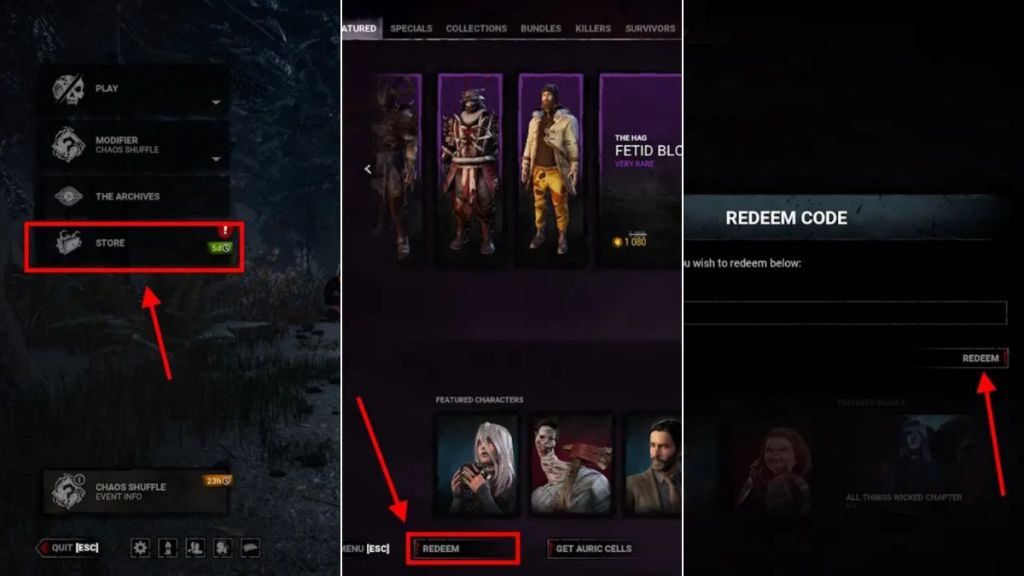
Once you have access to new codes, follow the steps below to redeem codes for Dead by Daylight:
- Launch Dead by Daylight on your device.
- Go to Store -> Redeem on the bottom left.
- Type a code in the Enter Code Here section.
- Click the Redeem button to get your reward.

Confused by a DBD Code? Promo Codes vs Error Codes
Alphanumeric codes are always flying around the Dead by Daylight community. However, not all “codes” are created equal, and some can be beneficial to you while others keep you from playing the game.
Promo Codes are officially released by Behavior Interactive to reward the player base with certain rewards. They grant you free in-game currency like Bloodpoints or Rift Fragments. Meanwhile, if you see a code appearing in a pop-up window after a match fails to load, you have run into an Error Code.
How to Fix DBD Error Code 8012
Error code 8012 is a common network-related issue in Dead by Daylight that signifies the game is having trouble connecting to the official servers. To fix error code 8012, you can try the following steps:
- Check Server Status: You can check the DBD server status to make sure the error is not caused by servers being down for maintenance or experiencing high traffic.
- Power Cycle: Restart your game, your device, and your internet router.
- Easy Anti-Cheat Repair: In the Dead by Daylight installation folder, find the EasyAntiCheat folder and run EasyAntiCheat_Setup.exe as an admin and select the “Repair” option.
How to Fix DBD Error Code 8028
Unlike error code 8012, error code 8028 is often associated with connection failures that keep your game from loading properly. Here is what you can try to fix error code 8028:
- Make sure your PC or console’s local time is set to “Automatic.” This is because having an incorrect date or time can cause authentication errors with game servers.
- Disable any VPNs or similar software tools, since they can interfere with the DBD connection protocols.
- Test your connection through different sources like a mobile hotspot to determine if the issue is with the game’s servers or your local ISP.
Best Tips for Maximizing Redeemed Dead by Daylight Codes
You can take certain steps to get the most out of Dead by Daylight codes and get the greatest possible impact on your progression, which includes:
- Optimize Your Bloodpoint Spending: Avoid dumping massive Bloodpoint rewards into your bloodwebs all at once. You can hold onto these large stashes until the developers add Anniversary events. This allows you to dump your points specifically for Anniversary Cakes, which provide Bloodpoint bonuses that will make future grinding more efficient.
- Avoid Auto-Bloodweb: If you are spending a ton of Bloodpoints at once, make sure you turn off Auto-Bloodweb. This allows you to manually clear your bloodwebs, and you can maintain full control over the rewards you claim.
- Fix “Invalid Code” Errors: If you run into an invalid message on a code you know is active, it is probably because of a hidden trailing space. When copying and pasting, it is easy to accidentally include a blank space towards the end of the code. This can cause your code to be rejected, so make sure to double-check for any invisible whitespace.
Where to Get More Dead by Daylight Codes?
We suggest you bookmark this page so you never miss out on new codes for DBD. However, if you want to find out about new codes officially, Dead by Daylight’s socials are the best place to go. You can check out the Dead by Daylight Discord server. For other updates and announcements, keep an eye on the Official DBD X account, DBD YouTube channel, and Dead by Daylight Facebook page.
How to Find & Equip Your New Cosmetics, Charms, and Banners
After you have redeemed your rewards, you can follow these steps to equip your newly acquired badges, charms, and other cosmetics:
- Choose either Survivor or Killer from the main menu.
- Click Characters on the left menu (the head-and-shoulders icon).
- Choose your character and select Customizations.
- To equip Charms, click the token-shaped icon on the far right of the sub-menu. (You can equip up to 3 charms!)
- To equip Banners and Badges, access your Player Card menu to customize your profile’s background look.
Moreover, you can try out the Roblox scary games if you love some spooky action. So, are you ready to jump into the horror mania? Tell us your favorite Dead by Daylight killer in the comments below.
Yes, Dead by Daylight codes are universal and work on all platforms.
No, DBD codes are not case-sensitive. However, it is advised to enter them exactly as shown to avoid typos.
New DBD codes are released irregularly, with the devs releasing new codes during game events and community milestones.
Error codes 8012 and 8028 are typically network-related errors that signify a failure to connect to the game servers.
Error Code 3 means that you were kicked from the DBD server because Easy Anti-Cheat failed to authenticate your account.
A BGDT is a permanent code used to redeem an in-game Trans Pride badge.
Yes, you can redeem DBD codes in-game regardless of your platform.