Update: checked for new Code a Business codes on October 1, 2026
Code a Business, aka Coding Simulator 2, is the perfect game to fulfill your coding wizard dreams. Start coding and build your business slowly, hire employees, and create your empire in minutes. But setting up a coding empire is no easy task, and you will need a ton of help from, you guessed correctly, code. Grab the latest Code a Business codes from our list here and get free diamonds and boosts. This way, your business will start booming instantly in the game.
All New Code a Business Codes
- 1mvisits: 5000 diamonds and 1 bronze employee pack (NEW)
- 500kvisits: 30% cash, diamond, NFT luck, and mining boost for 30 minutes
- 1000diamonds: 1000 Diamonds
Expired Code a Business Codes
Currently, there are no expired codes for this game. The above codes are still active, so once they expire, they will be moved to this section.
If you like simulation games on Roblox, there are a ton more you can try out. I recommend giving Drag Drive Simulator, Plant Brainrot Simulator, and Muscle Transform Simulator a try. Other than these, you can check out our Roblox game codes list and find your next adventure.
How to Redeem Code a Business Codes
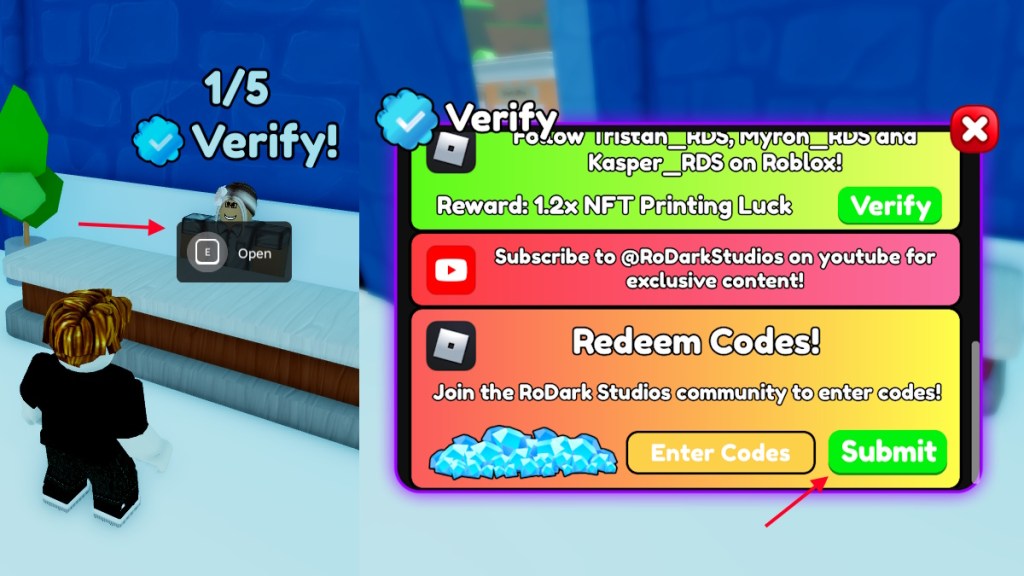
If you want to redeem the codes for Code a Business, you have to first join the RoDark Studios Roblox group. Once you have done that, follow the steps given below to redeem the codes:
- Launch Code a Business on Roblox.
- Click on Buy or head to the Shops building.
- Press and hold E to interact with the NPC with a verify mark.
- Type a working code in the ‘Enter Codes’ box.
- Click Submit to redeem the rewards.
How to Get More Code a Business Codes
New codes for Code a Business are often released by the developers on their social accounts. Sadly, they have multiple social accounts that can be hard for a normal person to keep track of. So, the best way to find new codes is by simply following our list here. Bookmark our list and visit whenever you want to find the latest codes in the game.
Another thing you can do is join the RoDark Studios Discord server. Here you will get notifications for the game’s updates. This way, you will know when to come here and check for codes.
Why Are My Code a Business Codes Not Working?
If your Code a Business codes are not working, then the first thing you need to do is check if you have made a typo. A good indicator for this is getting the Invalid error, which means the code doesn’t exist. If you have entered the code from our list, it should exist, so there is likely a typo you have made. Always copy and paste the codes directly from our list to get the rewards and avoid such issues.
Other than that, the code can simply be expired. If that’s the case, then all you can do is wait for more codes.
So, enjoying creating your coding business in this game? Let us know your opinion on the game in the comments below.