Update: added new Borderlands 4 Shift codes on October 2, 2026
Gearbox continues to release new Borderlands 4 Shift codes that offer free Golden Keys and cosmetics. While Golden Chests guarantee high-tier Epic (Purple) gear, they also give you a solid chance to score Legendary weapons that can help you power through tougher fights. So, if you’re looking to level up your arsenal, check out all the active Borderlands 4 Shift codes below.
All Active Borderlands 4 SHiFT Codes (October 2026)
- 39FJ3-CTJTK-CXTBC-JTJ3T-W95RK: 3 Golden Keys (NEW) (expires October 6)
- 3SX3J-3XZ55-CR33C-JBBJT-XH395: Mint Chipset Skin for Loveless the Hacker (NEW) (expires December 31, 2030)
- CSKJJ-63XZ6-BSKHK-SBBJJ-RRB9F: 2 Golden Keys (NEW)
- WZ53T-6SC9F-B95ZW-H3T33-W3JS6: 2 Golden Keys (NEW)
- THFB3-SW99B-W6JB5-JTTJ3-SKK9W: Golden Key
- BZR3T-TXHZB-KXTJ5-3JTJ3-CZ5WH: Golden Key
- 3ZRT3-K59KK-W6BJ5-B3TJ3-9WT99: C4SH Cosmetic “Like Vermillion Bucks” (expires Dec. 31, 2030)
- THX3B-H9FCW-CRBT5-BBJ3T-SXT65: 1 Golden Key, Ellie DLC Credits (never expires)
- J9RTT-KWCK3-CFBB5-BTBT3-FKRB6: 1 Golden Key
- BHRB3-XCWCJ-WFJTK-JTJJT-FCWF9: 1 Golden Key
- 3SRB3-95CC3-K6TB5-BTJTB-66ZHW: 1 Golden Key
- TZFT3-K9Z33-5FT3W-BJ33T-WZ5X5: 1 Golden Key
- J963B-S66WK-56J3K-JJT3T-BF9T5: Vault Hunter Skin “Luck of the Kairish” (expires Dec. 31, 2030)
- THFB3-R9XKK-CFBJW-T33BB-9R3CC: Halloween Cosmetics (expires Dec. 31, 2030)
- BH633-66F5C-WFBB5-33TJB-CBSR9: Vault Hunter Skin “You’re So Vein” (expires Dec. 31, 2030)
- 39FJB-CT5S3-5FTTW-BBB3J-F3HKZ: Vault Hunter Skin “Hype Squad” (expires Dec. 31, 2030)
- 3HX3J-RJWSJ-CFBBC-3BJ3B-RWZ36: Vault Hunter Skin “A Winter Borderland” (expires Dec. 31, 2030)
- BZ6J3-3JKHB-CX3B5-TTJTT-HJBZW: Vault Hunter Skin “The World on His Shoulders” (expires Dec. 31, 2030)
- 3ZXJB-HZBHT-KX3BK-BBTT3-BHHXJ: Vault Hunter Skin “Children of the Vex” (expires Dec. 31, 2030)
- J9XTB-SJWS3-WRTTC-BJTJJ-TH6TX: ECHO-4 Drone Skin “A Winter Borderland” (expires Dec. 31, 2030)
- 3S6BB-ZXT93-KRT3W-BT3T3-JW6TZ: Halloween Cosmetics (expires Dec. 31, 2030)
- J96JT-BCXKT-C6JJ5-JTJBB-BZTXJ: Harlowe Cosmetic “Maliwannabee” (expires Dec. 31, 2030)
- BZ6JJ-CB6CT-WXJJW-3TT3B-56FZ5: Vex Cosmetic “Mass Market Appeal” (expires Dec. 31, 2030)
- JZ6BJ-SBR5J-WF3BK-BT3BB-TX9HB: Amon Cosmetic “Cult Classic” (expires Dec. 31, 2030)
- TZXT3-XJXCB-CXBJW-BTTJT-9SK6B: Rafa Cosmetic “Savings Savior” (expires Dec. 31, 2030)
- JS63J-JSCWJ-CFTBW-3TJ3J-WJS5R: Break Free Cosmetic Pack (expires Dec. 31, 2030)
- T9RJB-BFKRR-3RBTW-B33TB-KCZB9: 1 Golden Key
All Expired Borderlands 4 SHiFT Codes
- J9X3J-XRH9T-5FJT5-3J3BJ-SZSK6
- JHX3B-XKHH3-KXTT5-3JTJB-3K53S
- 3ZRJJ-CCS93-W63T5-3BTT3-R6HCR
- J9FTJ-3CH9J-CXBJC-TTJJ3-9TZJS
- JZRBB-9T9SB-56J3K-TBBTT-RB939
- 3HR3B-RJ9SJ-5FT3C-JT3JT-J9XZX
- BZFBT-WT9S3-WR3BC-3TJ3B-HSFBB
- BZ6J3-TBHST-CX3JK-J33T3-9FJ95
- THXBB-9ZFST-5R3JW-33JJB-JT9RT
- TSR33-F96ST-CRTBK-JB3JT-5KJHR
- JHRJT-W9F93-WFJTK-3J3TT-Z6BK5
- 3HF33-JHFZ3-CRBT5-33333-S5W3X
- T96J3-SFRH3-56BJC-3TTTJ-ZBJSB
- 3ZR3T-6CSKW-WFTJC-JB33B-Z55ZT
- 3SFBB-CRXST-C6J3K-BTJTJ-XXK5S
- BS633-3XR9T-W6TJ5-J33JJ-RWT5T
- 3SFJB-SK6ZJ-KRTT5-B3BT3-3ST9W
- 3HRTT-65XHT-W6B3C-3JBTT-HCJ5B
- 3ZRJ3-KWRS3-C63JW-3JBBB-Z6S6X
- BZ63J-TKF9T-WR3BK-3BBJJ-KWFWR
- 5953B-RRK9X-BHWZK-S33BT-RXS93
- JHXTJ-Z3XHB-5FTJK-T3JJJ-HHJCZ
- KSK3T-WXWSR-THC95-ZBJ3B-WZXTF
- TSX3T-6TRH3-WFBTK-TJTB3-C3C6T
- 39XJB-C36SB-5RBJC-TBJBT-SC9J3
- JZF3T-T36HB-KX3BK-33J33-HTS3Z
- T9FBJ-X9C9B-5RJTW-TTB3T-B336X
- TZXJB-KZW9T-W63TW-BBT3T-SBH66
- 3SRBB-9FWSJ-KRJBK-BBBT3-JXRCW
- WH5TB-BS5SR-3HC9W-HT3B3-STRKW
- 3FR3T-66SKW-WFTJC-JB33B-Z55ZH
- 39XJ3-3HS9J-KXTTK-B3T3B-5B9KR
- J9X3J-XRH9T-5FJT5-3J3BJ-SZSK6
How to Redeem Borderlands 4 Shift Codes
Borderlands 4 Shift Codes can be redeemed using two different methods. The first is directly through the Shift website after linking the account tied to your preferred gaming platform. The second method can be found in the game itself, but unlike previous Borderlands titles, you won’t receive your reward within the ‘Mail’ tab.
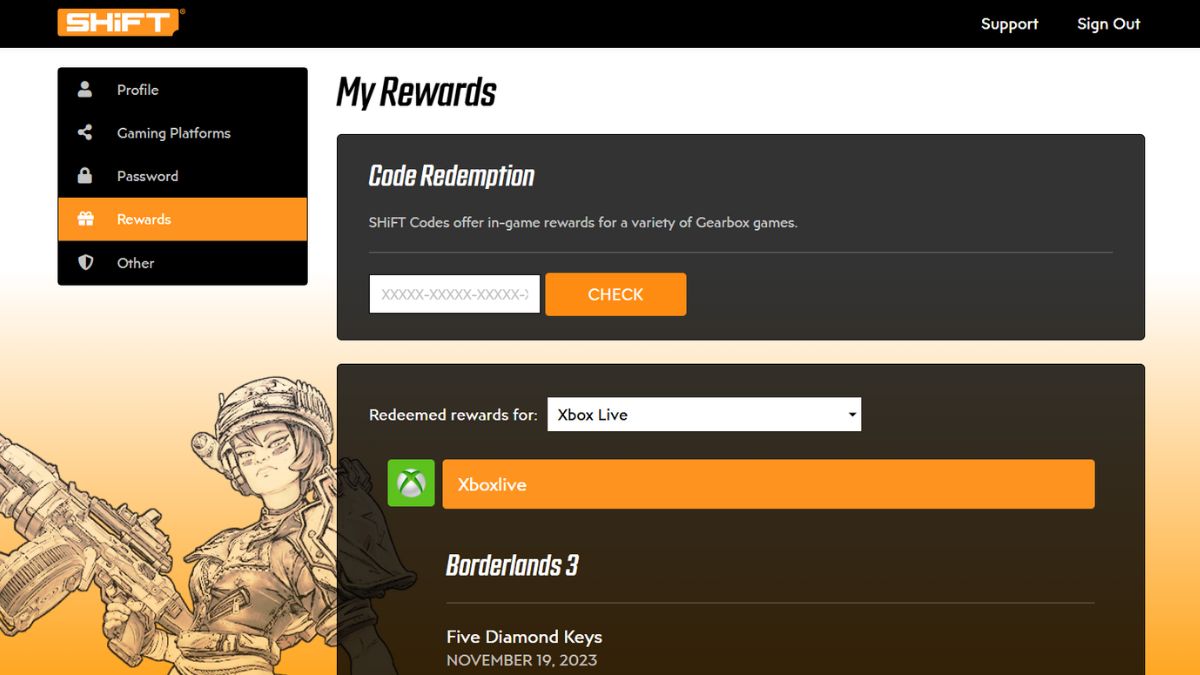
Method 1: Redeeming Via the Official SHiFT Website
- Create a Shift account on the official website.
- Select the ‘Gaming Platforms‘ tab, and link your preferred platform to your Shift account.
- Now, select the ‘Rewards‘ tab.
- Input your Shift code in the ‘Code Redemption’ section.
- Hit ‘Check,’ and if the code is valid, you’ll receive an in-game email with your rewards.
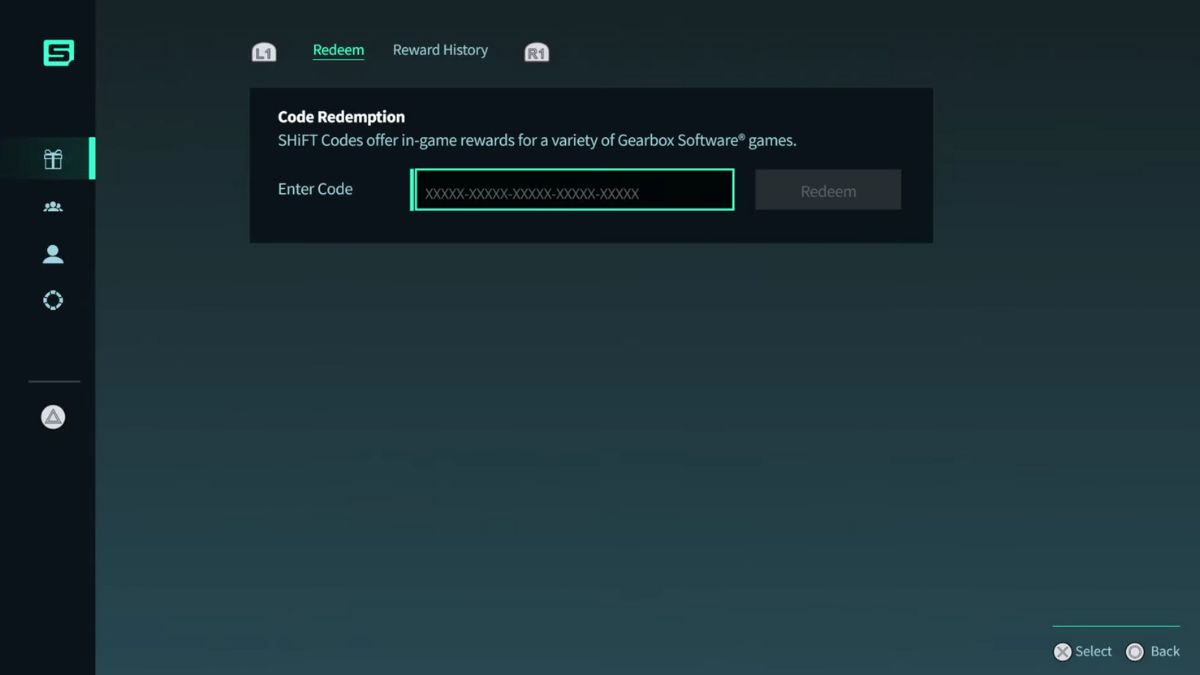
Method 2: Redeeming In-Game via the Pause Menu
- Load into Borderlands 4 and open the pause menu.
- Click on the ‘Shift‘ tab.
- Now select the ‘Rewards’ tab sitting at the top of the left sidebar.
- Type in your code and hit the Redeem button.
How to Get More Borderlands 4 Shift Codes
Shift codes for Borderlands 4 are dropped at random times by Gearbox devs, which is why it can be tricky to keep up with their release. Gearbox CEO, Randy Pitchford, is also known to reveal codes almost on a whim: a fun idea, but again, tricky to keep up with.
If you’d like to stay in tune with their release, make sure to follow the official Borderlands account on X, as well as Randy Pitchford’s personal account, @DuvalMagic.
With that being said, the easiest way to get Shift codes is on this page itself. We will update this post immediately after the release of every code, meaning you’ll always stay in the loop. So, make sure to bookmark this post and revisit for more Golden Keys.
Where to Use Golden Keys in Borderlands 4 (Golden Chest Locations)
To use Golden Keys, you’ll have to go to one of the four locations with Golden Chests. You’ll come across most of these locations as part of the main story, with Outbounders HQ being the very first one. You can also respec your character at these safehouses.
Read our complete guide on how to respec skills in Borderlands 4 if you want to reset your build. With that being said, here are the names of all four locations:
- The Launchpad
- Belton’s Bore
- Carcadia
- The Lockaway
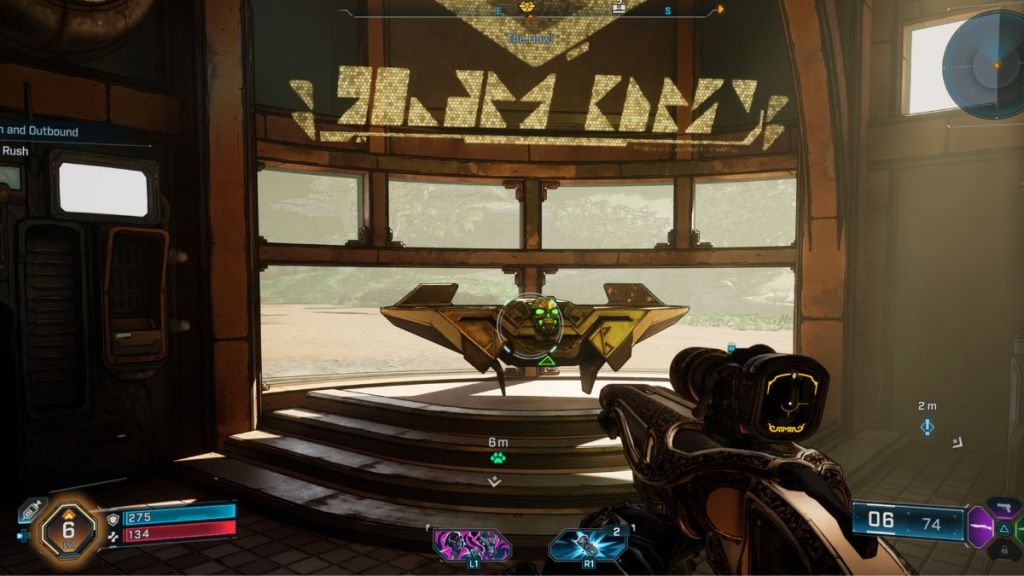
Tip: Don’t hoard your Golden Keys until the absolute endgame. The Borderlands community recommends spending one or two keys every 10 levels during your first playthrough to replace outdated gear and keep your equipment up to date.
Why Are My Borderlands 4 SHiFT Codes Not Working?
If a Borderlands 4 SHiFT code isn’t working, there are a few common reasons behind it. Here are the most common ones you must keep in mind before panicking:
- The code has expired: Most SHiFT codes are only available for a limited time before they expire.
- The code has already been redeemed: Each SHiFT code can only be claimed once per account.
- Your SHiFT account isn’t linked: Make sure your PlayStation, Xbox, Steam, or Epic Games account is linked to your SHiFT account before redeeming codes.
- Server connection issues: Temporary Gearbox or 2K server problems can prevent codes from being redeemed or rewards from appearing immediately.
- The code was entered incorrectly: Double-check for typos or copy and paste the code directly to avoid mistakes.
- Golden Keys showing as 0: Some players have reported their Golden Keys disappearing after logging in. This is usually caused by the game not syncing properly with the Gearbox and 2K servers. Wait until your SHiFT account fully connects before opening a Golden Chest or restarting the game to refresh your inventory.
That is everything you need to know about Borderlands 4 Shift codes and how to redeem them. For more on the game, be sure to check an overview of Borderlands 4’s endgame.
No, there are currently no Borderlands 4 codes for Diamond Keys.
Yes. Most SHiFT codes remain active for a limited time before expiring. We update this guide whenever new codes are released or older ones stop working.
Shift codes work across supported platforms once your gaming account is linked to your SHiFT account.
This usually happens because the code has expired, has already been redeemed on your account, or your SHiFT account is not linked correctly.
Gearbox releases new SHiFT codes during game updates, community events, seasonal promotions, and special announcements.













 Ajith Kumar