Scrooms is a cozy Roblox adventure game where you explore a mysterious world, catch mushroom creatures called Scrooms, and collect rare variants. You can sell your catches, upgrade your instruments, discover new regions, and complete your Scroomdex as you progress. Here’s what you can find in the Scrooms Discord server, along with the latest status of the official Trello board link.
Official Scrooms Discord Server Link
You can use the official Scrooms Discord server to keep up with development and connect with the community. The server has dedicated channels for announcements, update logs, sneak peeks, polls, social posts, and community activities. This makes it the best place to follow announcements, check sneak peeks, share your creations, and discuss the game with other players.
What Can You Find in the Scrooms Discord Server?
The Scrooms Discord is organized into several categories, so you can find game news, community discussions, and development updates without digging through general chat.
- Important: The rules, announcements, sub-announcements, and information channels cover server guidelines, important news, and general information. Start here when joining the community, and keep an eye on announcements for major updates.
- Scrooms: The update logs, sneak-peeks, polls, and social-feed channels focus on development news and community updates. Visit these channels to follow new features, previews, and polls about the game.
- Community: The giveaways, content, boosts, and events channels cover community activities. They provide places to follow giveaways, share content, and keep up with server events.
- General: Chat with other players in general, share images in media, use bot commands, ask questions, or visit dank-memer.
- Game Related: Use suggestions to share ideas, bug reports to report issues, and fan art to post artwork inspired by Scrooms.

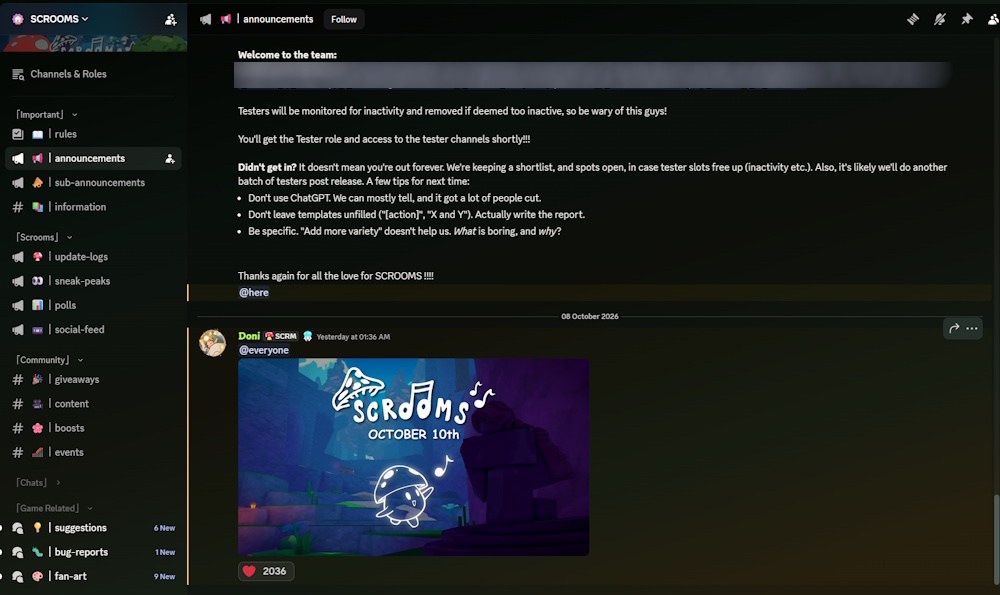
These Scrooms Discord channels give players ways to interact with the community and help improve the game’s development. If you encounter a bug or have an idea for a new feature, the dedicated channels provide a more suitable place to share it than general chat.
Scrooms Discord Roles and Permissions
The server also has a role system that unlocks additional permissions as members progress through its ranks. The roles include Redcap, Funglebee, Mistdrop, Scholaroom, Pagodai, Ignara, and The Pale Vessel, followed by higher ranks and SCROOM Booster.
The permissions range from posting images and GIFs to adding reactions, creating polls, sending voice messages, and changing nicknames. Higher ranks unlock additional features, including priority speaker, custom emojis and stickers, community events, and slowmode bypasses.
The server also has a Scream Lord rank for the top leaderboard member. Scroom Booster members receive several extra permissions, although their role does not include every perk available to higher ranks.
Official Scrooms Trello Board Link
At the time of writing, Scrooms does not have an official Trello board. No confirmed public board exists as a centralized reference for Scrooms, instruments, mutations, regions, or progression mechanics.
For now, you can follow the official Discord or stick to our Scrooms coverage for all the important guides, codes, and tier lists.
No, Scrooms does not currently have an official public Trello board. You can follow development updates and sneak peeks through its Discord server instead.
Open the SCROOMS Discord and visit update-logs for development updates or sneak-peaks for previews of upcoming content. The announcements channel is also worth checking for major news.















![[OPINION] Ice Caves Could Remind Fans Why Minecraft Has 'Mine' in Its Name](https://static.beebom.com/wp-content/uploads/2026/10/Ice-Caves-Make-Mining-Fun-in-Minecraft.jpg?w=300&quality=75)