Update: added new Command an Army codes on October 3, 2026
Roblox Command an Army is a fresh strategy game that puts you in charge of a growing force, where recruiting the right units. Having enough Gems can make a big difference on the battlefield. If you’re starting or trying to expand your roster, the latest Command an Army codes can give you a useful pile of free Gems without making you grind for them.
All New Command an Army Codes
- LAESTRYGONIAN: 700 Gems and 2 Skill Crystals (NEW)
- UPDATE3: 700 Gems and 2 Skill Crystals (NEW)
- MONGOLS: 1,000 Gems and 2 Skill Crystals (NEW)
- SKILLTREE: 5 Skill Crystals
- OCTOBER3: 1000 Gems
- SATURDAY: 1000 Gems
- RANKED: 300 Gems
- GUILD: 300 Gems
- PARRY: 300 Gems
- RAPIER: 300 Gems
- OPTIMIZE: 700 Gems
- WAR: 500 Gems
- RELEASE: 500 Gems
Expired Command an Army Codes
- SHIELDBREAKER
- CONQUER
- COMMANDER
- SORRY
- BUGFIX
- LEBALANCE
- 10KGoal
- D0ggy103
- CONQUEST
If you’re looking for more free rewards, check out our Roblox Game Codes list. You can also try our Sell Ores Codes, Junk Mechanics Codes, and Fisch Codes guides for more freebies.
How to Redeem Command an Army Codes
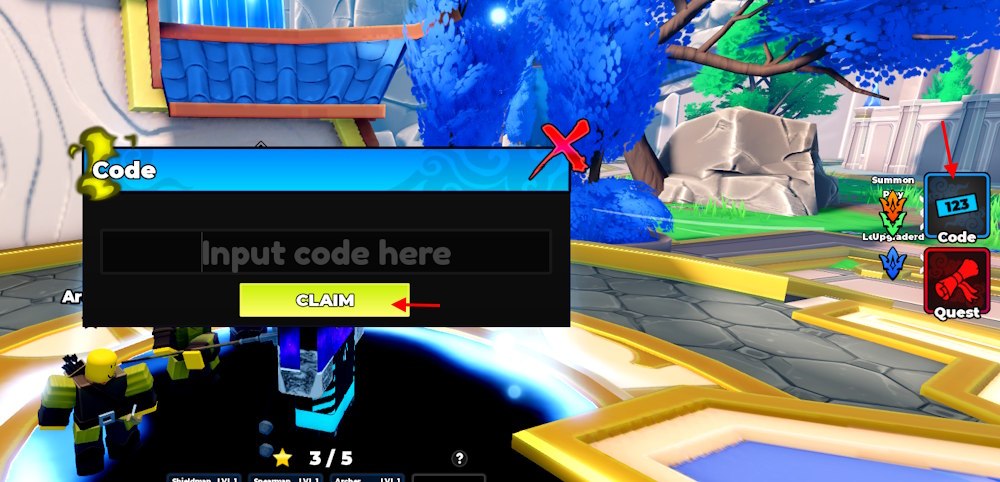
To redeem the codes for Command an Army, you must clear the tutorial of the game. Once done, follow these steps to get the free rewards:
- Launch Command An Army on Roblox.
- Find the Codes button on the right side of the screen.
- Enter one of the active codes from the list above.
- Click Claim to collect your Gems.

How to Get More Command an Army Codes
New codes tend to arrive around updates, balance changes, bug fixes, and other game milestones. The official COMMAND AN ARMY Discord is the best place to watch for announcements directly from the developers.
We’ll also keep this list updated as new rewards are released or existing codes stop working. Check back after major updates so you don’t miss the next batch of free Gems.
Why Are My Command an Army Codes Not Working?
If the codes for Command an Army aren’t giving you their rewards, check these things first:
- Check the spelling: Enter the code exactly as shown in the table.
- Check capitalization: Codes can be case-sensitive.
- Make sure the code is still active: Developers can deactivate codes without much warning.
- Finish the tutorial: The Codes button isn’t available until you’ve completed the game’s opening tutorial.
If everything looks correct and the code still fails, try rejoining the game before attempting it again.